

If you run a Canadian business that sells into the U.S. or pays U.S. suppliers, you have probably felt it: money goes out, money comes in, and somehow the “conversion” cost is always bigger than you expected. This is exactly where a multi-currency account Canada QuickBooks setup earns its keep, because it reduces unnecessary conversions and keeps your books clean enough to trust your reports.
In plain terms, you want two outcomes at the same time. You want fewer FX fees, and you want bookkeeping that does not turn into a monthly mystery novel.
Let’s walk through what the “3% FX fee” really costs, what to look for in a real-world multi-currency setup, which options Canadian SMBs are actually using in 2026, and how to run it in QuickBooks Online without making reconciliation harder than it needs to be.
The “3% FX fee” problem in real numbers
A lot of owners describe FX as “about 3% every time we move money.” Sometimes that is accurate. Sometimes it is worse. Either way, it adds up because the cost can show up in more than one place.
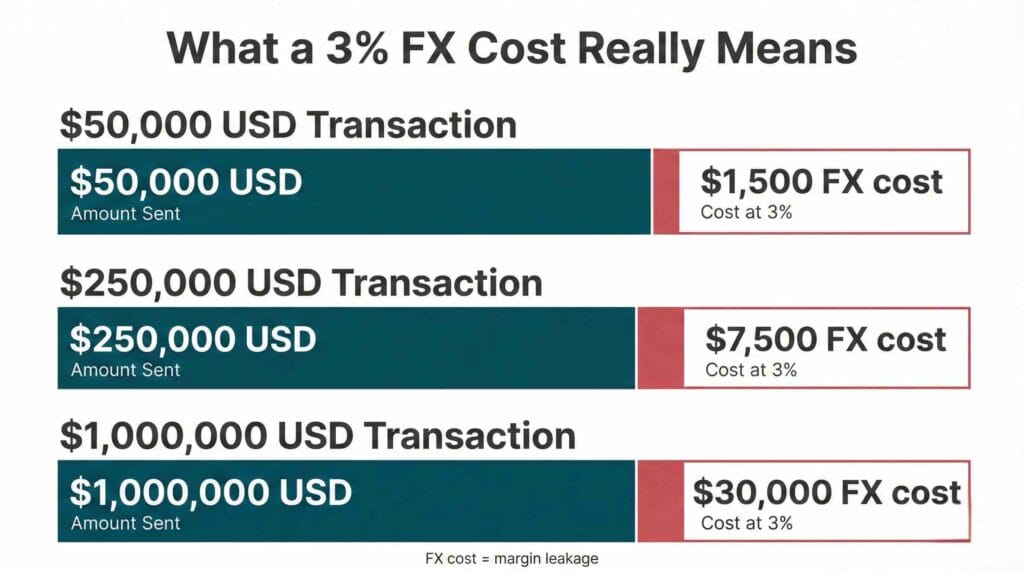
Here’s where FX fees commonly hide in day-to-day operations: 1) card foreign transaction markup, 2) the bank’s FX spread between the posted rate and your actual rate, 3) wire or SWIFT fees, and 4) payment processor auto-conversion that happens before funds hit your account.
Now the math that gets decision-makers’ attention.
If your business converts $50,000 USD over a year and the total cost is around 3%, that is about $1,500.
At $250,000 USD, that is about $7,500.
At $1,000,000 USD, that is about $30,000.
That is margin leakage. It does not improve quality, delivery, or customer experience. It is just the cost of friction. A multi-currency account Canada QuickBooks approach is about removing that friction, and then accounting for the rest properly.
What to look for in a multi-currency setup
This is where many businesses get tripped up. They shop for “a USD account,” open one, and then wonder why the workflow still feels messy.
A practical multi-currency setup includes the account, the payment rails, the controls, and the way transactions land in QuickBooks.
Here’s what I look at with clients before we touch anything in the bank.
You need to receive, hold, and pay in the same currency when possible. If you get paid in USD, convert to CAD, then later convert CAD back to USD to pay suppliers, you can pay FX twice for no good reason. A multi-currency account Canada QuickBooks setup is often about stopping the double conversion.
You want transparent pricing. “Good rates” is not specific enough. Ask what the spread is, what the fixed fees are, and what triggers extra charges.
You need the payment rails your business actually uses. In Canada, domestic electronic payments are typically EFTs, and if you’re moving U.S. dollars cross-border, you may also need ACH-style USD rails through your bank or provider. The right rails depend on whether you are paying suppliers, collecting receivables, running payroll, or paying contractors.
Controls matter earlier than most owners expect. Once two people can move money, you want permissions, approvals, card limits, and an audit trail you can live with.
Finally, and this is the part bookkeepers care about: integration reality. Can you get bank feeds into QuickBooks Online cleanly? If not, can you export statements in a format your team can reconcile quickly without manual rework?
If you have those pieces, your multi-currency account Canada QuickBooks workflow becomes predictable. Predictable is what makes month-end faster and reporting more reliable.
2026 options Canadian SMBs actually use
Most Canadian SMBs land in one of two buckets, and plenty use a hybrid.
Traditional bank USD accounts can be great for “USD in, USD out” flows. Fintech multi-currency wallets can be great for multiple currencies, speed, and sometimes fee transparency.
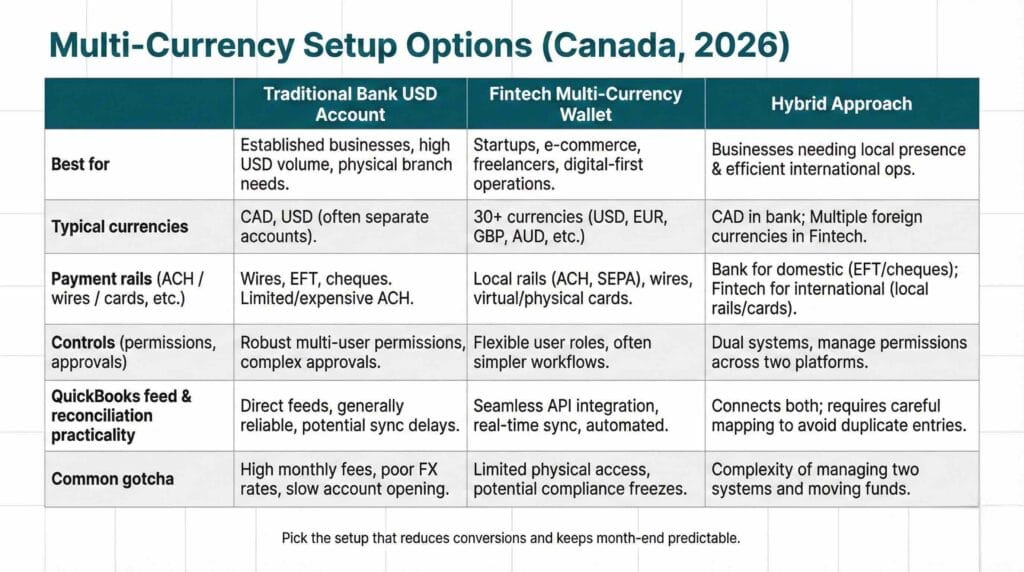
Traditional bank USD business accounts
If your main goal is to hold USD and pay USD suppliers, a major bank USD account is often a sensible baseline. Here are common starting points:
U.S. Dollar Business Account at RBC
TD U.S. Dollar Basic Business Plan
CIBC U.S. Dollar Current Account fees and details
Scotiabank business bank account options
Where banks often win: stability, familiarity, and the broader relationship, including lending, cards, and cash management. Where they can feel costly: spreads, wire fees, and sometimes less flexibility when you need multiple currencies beyond USD.
Fintech multi-currency wallets and accounts
If you invoice internationally, pay overseas suppliers, or want multi-currency receiving details, fintech options can be attractive. For example, you can review Wise Business pricing for receiving and getting paid if your priority is transparent costs for getting funds in. If you’re focused on moving money internationally, OFX international business payments is another option many Canadian businesses compare, and it helps to scan the OFX fee schedule so you understand what triggers extra charges. And if you want a more “business banking” style experience with CAD and USD positioning, it’s worth looking at Venn business banking options in Canada and then mapping how the transactions will land in your accounting workflow.
Where fintech often wins: multi-currency functionality, speed, and clearer fee schedules. Where you need to be careful: how the account connects to your accounting workflow, and how cleanly transactions import into QuickBooks.
In practice, a lot of businesses keep core CAD operations with a traditional bank and run FX-heavy flows through a fintech wallet. The right answer depends on volume, currencies, and how tight your month-end needs to be.
Either way, the goal is the same: design a multi-currency account Canada QuickBooks system that reduces conversion events and produces bank data your team can reconcile without headaches.
Multi-currency account Canada QuickBooks and how the bookkeeping should work
This is the part that saves you the most time long term, because multi-currency can create messy books if you turn it on without a plan.
First, a big warning that’s easy to miss when you are in a hurry. QuickBooks Online multicurrency is effectively a one-way door. Intuit’s guidance notes that once you turn on Multicurrency, you cannot turn it off and you cannot change the home currency later. If you want the source straight from Intuit, read Set up and use Multicurrency in QuickBooks Online.
So before you flip the switch, confirm you truly need it. If you do, then set it up with intention.
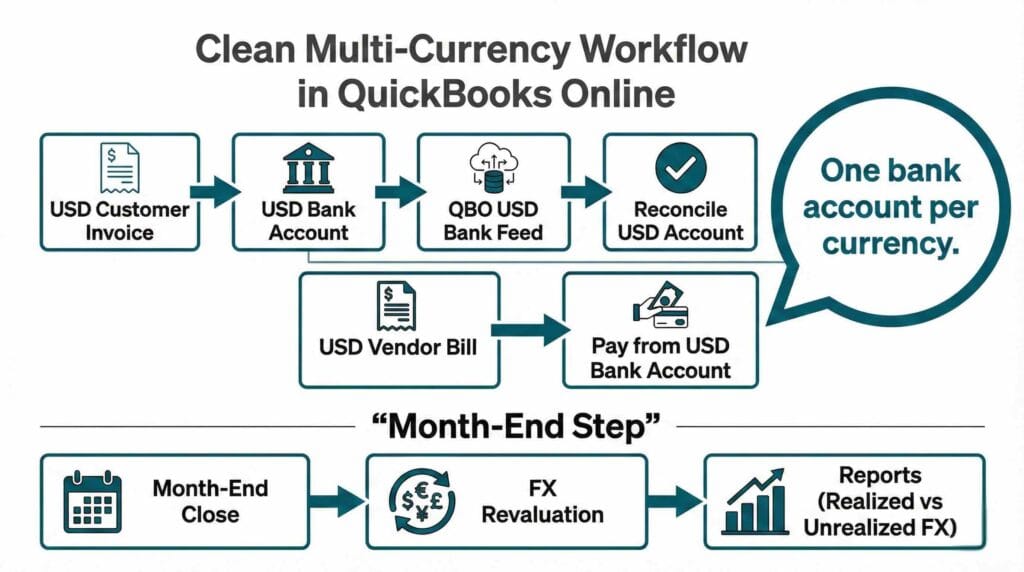
One bank account per currency, named like a human would name it
In QuickBooks Online, use a separate bank account register for each currency. Keep names consistent so your team does not accidentally post a USD transaction to a CAD account.
A simple naming pattern works well in practice: USD Operating, USD Receivables Clearing if you need it, and EUR Clearing only if you truly transact in EUR. This structure is the backbone of a clean multi-currency account Canada QuickBooks file.
Match currency end to end whenever possible
If you invoice a customer in USD, receive the funds in USD, and pay USD suppliers from that same USD account, you reduce conversions and you reduce the number of FX gain or loss events you have to explain later.
If you convert USD to CAD, that conversion is where your realized FX difference shows up. That is not “bad.” It just needs to be deliberate and documented.
Realized vs unrealized FX gains and losses
A common owner question is: “Why did my profit change when we did nothing?”
If you have foreign currency balances, FX can affect reporting in two ways.
Realized FX gains or losses happen when you actually settle something. You collect an invoice, pay a bill, or convert currency and the CAD equivalent differs from when it was originally recorded.
Unrealized FX gains or losses show up at period end when balances are revalued for reporting purposes.
QuickBooks provides guidance on how home currency adjustments affect foreign balances. If you want the official reference, see Enter home currency adjustments for your foreign balances.
If you want your month-end financials to be reliable, you need a consistent month-end process for revaluation. This ties directly into your multi-currency account Canada QuickBooks month-end close.
If your month-end close is currently a bit of a scramble, it’s worth tightening that process first. You can cross-check your workflow against our guide: Month-End Close Checklist for Canadian Businesses.
Reconciliations and the “clearing account drift” problem
Here’s what usually goes wrong in multi-currency files.
A business uses a payment processor, the processor converts funds, deposits net amounts, and fees get posted inconsistently. Or a team uses a clearing account, but no one clears it fully. Over time, the clearing account becomes a dumping ground for differences that never get resolved.
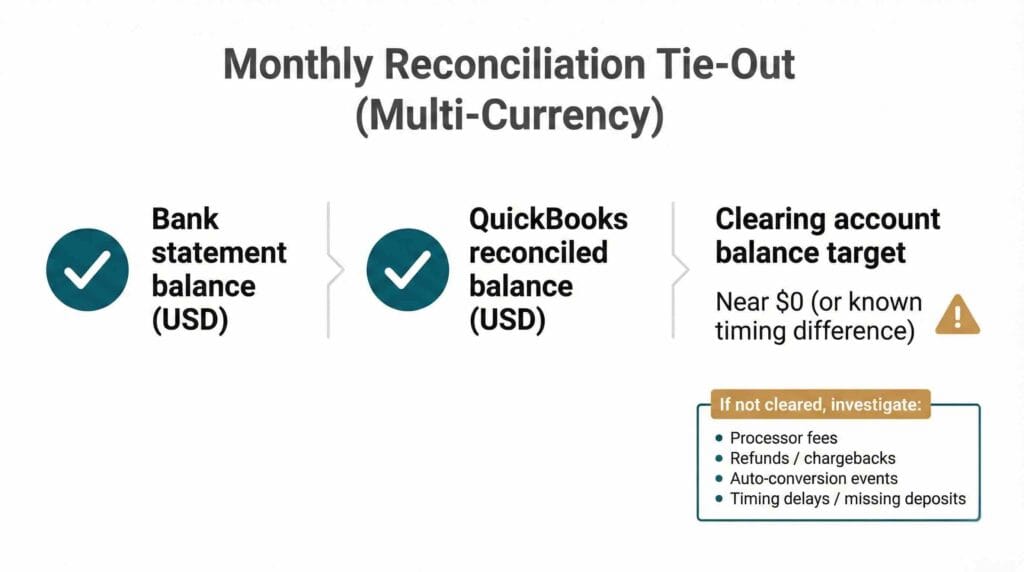
If you want your multi-currency account Canada QuickBooks setup to stay clean, be strict about these habits. Reconcile each currency bank account monthly. Tie processor deposits to processor reports, not just to what hit the bank. If you use a clearing account, clear it down to a known balance every month.
If you are dealing with POS systems or online payments, it helps to keep your integrations tidy so deposits, fees, refunds, and chargebacks don’t create reconciliation noise. If that’s part of your setup, you’ll get value from our guide on POS integration with QuickBooks: A Clean Setup Guide for 2026, especially if you want your payouts to match the right sales days and clear properly each month.
A practical multi-currency account Canada QuickBooks workflow, step by step
This is a simple workflow I recommend for many Canadian SMBs. It’s not fancy, but it works.
Step 1: Open the accounts you need, not the accounts you might need someday. If you only transact in USD, start there.
Step 2: Decide where conversion should happen. Ideally, you convert less often, in larger batches, with clear documentation.
Step 3: Turn on QBO Multicurrency only after you have a plan. If you need the reference, use Set up and use Multicurrency in QuickBooks Online.
Step 4: Add one bank account register per currency and connect feeds if they are stable. If feeds are unreliable, use consistent statement imports.
Step 5: Set up customers and vendors in the correct currency before you start posting a pile of transactions.
Step 6: Run month-end revaluation consistently, then reconcile. QuickBooks’ guidance on revaluation and adjustments is here: Enter home currency adjustments for your foreign balances.
Do that, and your multi-currency account Canada QuickBooks setup stops being fragile.
Cross-border invoicing basics from a business lens
Cross-border invoicing is where FX and bookkeeping meet the real world.
Here’s the simplest approach that avoids a lot of cleanup later. Invoice in the customer’s currency if that’s how the deal is priced. Receive payment into the matching currency bank account. Avoid auto-conversion at the processor level unless you have decided that is the best place to convert.
Documentation matters more than people think. Keep customer contracts, invoices, service dates, and processor statements organized. When someone asks “Why is this USD deposit different from the invoice?” you want an answer in two minutes, not two hours.
Sales tax is nuanced across borders. The correct treatment depends on what you sell, where the customer is, and where the benefit of the service is considered to occur. Work with your advisor to set the rules for your specific situation.
If you pay contractors across borders, have employees in more than one location, or you’re simply trying to reduce compliance risk as you grow, it’s worth tightening your payroll processes alongside your bookkeeping. Our article CRA Payroll Audit Red Flags: A 2026 Guide for Employers walks through common problem areas that tend to trigger questions, so you can keep documentation organized and avoid the “we’ll fix it later” scramble.
Choosing between bank vs fintech
If you are trying to decide, I usually ask owners four questions.
How much foreign currency do you move monthly, and how often?
Are you primarily USD only, or do you truly need multiple currencies?
Do you need Canadian EFT rails, and do you also need ACH-style USD rails for U.S. payments?
How clean do your books need to be for reporting, financing, or partners?
A low-volume business might do fine with a basic bank USD account and a disciplined process. A growing business with regular USD receivables and payables often benefits from a more intentional multi-currency account Canada QuickBooks setup, sometimes with a fintech layer for conversions and receiving details.
If you do job costing or project accounting and you are trying to keep margins tight, FX noise can make project profitability harder to read. You may want to align your FX workflow with how you track jobs. See Job Costing in QuickBooks for contractors and trades.
Common mistakes I see and how to avoid them
Mistake 1: Turning on multicurrency in QuickBooks “to test it.” Because you cannot turn it off, this can lock you into a complexity level you did not need. Make the decision once, and do it deliberately.
Mistake 2: Mixing currencies in one bank account register. It makes reconciliation painful and reporting unreliable. Keep separate bank accounts per currency in QBO.
Mistake 3: Letting payment processors auto-convert without noticing. This is where “mystery FX” shows up. Confirm settings and understand what currency settles to which account.
Mistake 4: Not doing month-end revaluation. Unrealized FX differences do not disappear. They just show up later, usually at the worst time.
Mistake 5: No policy on who converts currency and when. Even a simple internal rule helps. If you convert on a schedule, your entries are more consistent and your reporting is easier to explain.
Every one of these mistakes can be fixed, but it is cheaper to design the multi-currency account Canada QuickBooks process properly at the start.
A quick checklist before you switch anything
Keep this short and practical. If you can answer these, you are ready to implement.
Do we need USD only, or multiple currencies?
How much FX do we pay now, roughly, in a year?
Where do we want conversion to happen, and how often?
Do we need approvals, permissions, and card limits?
Will statements and feeds reconcile cleanly in QuickBooks monthly?
Are we ready to enable QBO Multicurrency knowing it cannot be turned off?
If you are unsure on the QuickBooks side, read Set up and use Multicurrency in QuickBooks Online before you change anything.
Wrapping it up what good looks like
A good multi-currency setup is not just about shaving a fee here and there. It is about building a system that you can run every month without stress.
When your multi-currency account Canada QuickBooks workflow is working, three things happen. You convert less often, with better visibility into fees. You can reconcile each currency account monthly without weird clearing balances. Your financial reports make sense because FX is separated and documented properly.
If you are planning changes for 2026, treat multi-currency as a finance ops project, not a random banking decision. It touches pricing, cash flow, controls, and reporting all at once.
At Valley Business Centre, we’ve supported businesses across Metro Vancouver, Whistler, Squamish, and the Sea to Sky Corridor for more than 30 years with bookkeeping, payroll, tax preparation, and cloud accounting systems.
If you’re a BC business selling cross-border or paying U.S. suppliers in Vancouver, Surrey, Burnaby, Richmond, Coquitlam, or Kelowna and you want fewer FX surprises without last minute cleanup, reach out. We can help you tighten up tracking, reconcile deposits and payouts, and keep documentation organized so your multi-currency reporting stays clear and year end feels straightforward instead of stressful.
