
QBO vs Xero Canada decisions get harder the minute you stop doing everything yourself.
When it’s just the owner in the books, almost any cloud accounting system can feel “fine.” You send invoices, reconcile the bank, and move on. But once you add a bookkeeper, an operations manager, a bill approver, and maybe a second location, the accounting platform becomes part of your internal controls. It affects how quickly you close the month, how clean your reporting looks, and how confident you feel signing off on numbers.
In 2026, QuickBooks Online (QBO) and Xero are both strong options for Canadian businesses. The better choice is the one that fits how your team actually works, not the one with the flashiest demo. If you’re scaling, you’re not just choosing software. You’re choosing a workflow.
The real question in 2026 is not “which is better?”
If you’re comparing QBO vs Xero Canada, the most common trap is treating it like a feature checklist. Most features overlap. The real question is simpler and more practical: how does money move through your business, and who needs to touch it at each step?
Picture a normal week. Someone creates a quote. Someone else converts it into an invoice. Payments arrive through a processor, and deposits hit the bank in batches. Bills show up in a shared inbox, a manager approves them, and your bookkeeper schedules payments. Payroll runs on a cycle, and then leadership wants a clear picture of profit by location, department, or service line.
When teams grow, we usually see four outcomes matter more than everything else. You want month-end to be faster and less fragile. You want approvals and permissions that match reality. You want reporting that mirrors how you run the business. And you want integrations that do not break reconciliation every other month.
Keep those outcomes in view, and the QBO vs Xero Canada decision becomes much easier to defend in a leadership meeting.
QBO vs Xero Canada: the core differences that matter
Here’s where QBO vs Xero Canada comparisons become practical rather than theoretical. It usually comes down to users, reporting structure, and the “gotchas” that show up later, like multi-currency and migration cleanup.
Users and collaboration
User access is not just about cost. It shapes behaviour.
With QBO, user limits vary by plan, and Intuit’s own QuickBooks vs Xero comparison shows examples such as EasyStart (1 user), Essentials (3), Plus (5), and Advanced (25). In real life, that structure can be helpful when you want to keep the accounting file controlled as the business grows. It can also become a constraint if you have several managers who want to log in just to review results or approve bills.
Xero is often positioned as “unlimited users” in comparisons, which tends to appeal to teams that want broader internal visibility without constantly revisiting plan upgrades. That does not mean you can ignore permissions. It means you can design access around roles without the same kind of user-count pressure.
When we talk through QBO vs Xero Canada with management teams, a good early question is: do you want plan-based limits to act as guardrails, or do you prefer a collaboration-first approach where your process and permissions do the heavy lifting?
Tracking and reporting structure
This is the deal-breaker for many growing businesses because it affects daily coding decisions, not just year-end reporting.
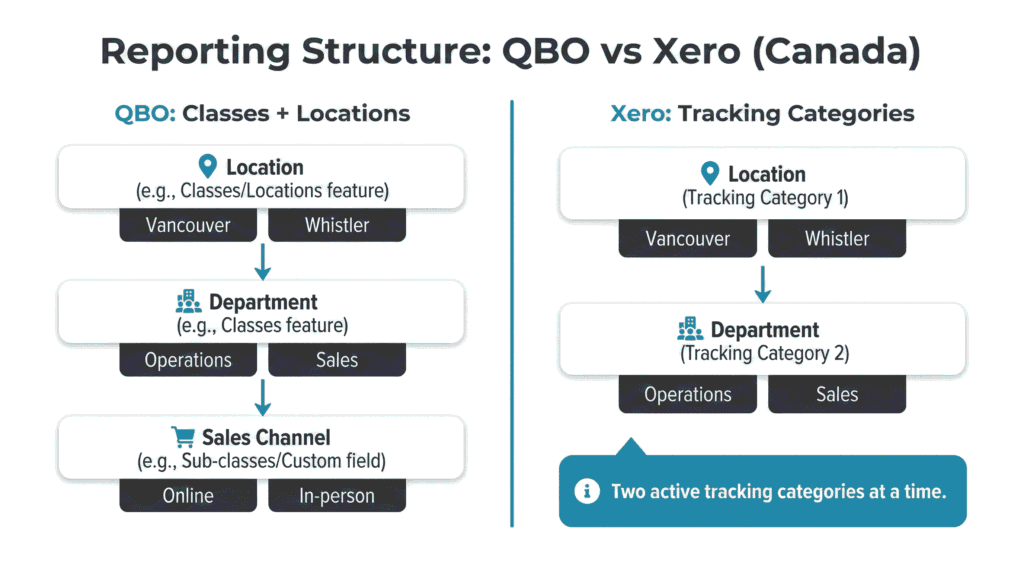
QBO supports classes and locations, and Intuit outlines how those features work alongside other plan limits in its QBO usage limits documentation. In practice, that gives you a lot of flexibility to set up reporting that matches the way leadership thinks about performance.
Xero uses Tracking Categories, and Xero’s help documentation explains that you can only have two active tracking categories at a time. The details are laid out in Xero tracking categories. Two dimensions can be perfect if your reporting model is simple and stable. For example, Location and Department often works well.
The tension shows up when the business wants three dimensions. If leadership wants to see performance by Location, Department, and Sales Channel (or by Branch, Job Type, and Project Manager), the two-category model can feel tight. It is not “bad.” It just forces you to make trade-offs early, and those trade-offs can be painful to reverse later.
This is one of the most important QBO vs Xero Canada considerations for growing teams, because your staff will live with the tracking structure every day. A structure that matches the business reduces miscoding, speeds up review, and makes reporting feel trustworthy.
Multi-currency rules you cannot casually undo
Multi-currency is easy to ignore until it suddenly becomes urgent, usually after you add a US supplier, start invoicing in USD, or sign a contract priced in another currency.
QBO offers multi-currency on certain plans, and Intuit notes an important point in its QBO multi-currency guidance: once multi-currency is enabled, you cannot turn it off or change the home currency. That is not a reason to avoid it. It is a reason to enable it deliberately, with a plan.
Xero includes multi-currency in its Premium plan in Canada, as shown on the Xero pricing plans (Canada) page. If multi-currency is part of your 2026 reality, the practical question is not “who has it.” The question is “can we set it up correctly, and can our team maintain it without creating noise in reporting?”
If you want a deeper operational view of how multi-currency impacts bank feeds, settlements, and reconciliation, our post on Best Multi-Currency Accounts for Canadian SMBs pairs well with this decision.
When QBO wins for Canadian growing teams
There are plenty of scenarios where QBO vs Xero Canada is not a close call because QBO matches the operating model.
QBO often wins when your reporting needs are more complex and you want that complexity handled inside the accounting system rather than in spreadsheets. That is especially true for multi-location operations, department-based management, and businesses that want to separate profitability by service line or job type.
We also see QBO fit well when leadership wants tighter guardrails. Plan-based controls can reduce the “too many cooks” problem, where multiple people touch the books without a consistent process. That matters because the cost of confusion usually appears at month-end, when someone is trying to explain why the numbers shifted, or why the bank reconciliation does not match.
QBO can also be a natural choice if you prefer a more consolidated vendor family, especially if you plan to add payroll through QuickBooks. Intuit outlines payroll options for Canada on QuickBooks Payroll Canada. Whether you use it or not, it’s useful to understand what “inside the same ecosystem” could look like.
As teams grow, month-end discipline becomes a competitive advantage. If you want a practical routine that reduces surprises, the Month-End Close Checklist for Canadian Businesses is a good reference for building consistency across your team.
QBO vs Xero Canada for multi-location reporting and controls
If you operate one corporation with multiple locations, consistency matters more than fancy features.
In QBO, classes and locations can be set up to mirror how managers talk about the business. That might look like a location for each branch and a class for each department. When the structure matches reality, your team codes transactions correctly without having to stop and think every time.
In a QBO vs Xero Canada comparison, QBO tends to be the easier fit when you need more than two meaningful reporting dimensions, or when leadership is not willing to compromise on how they review performance. The goal is simple: less rework, cleaner reporting, and fewer arguments about what a number “really means.”
When Xero wins for Canadian growing teams
Xero is often the better fit when collaboration is a priority and you want a modular tech stack.
If you’re comparing QBO vs Xero Canada and you already rely on specialized tools for payroll, scheduling, time tracking, POS, job management, or inventory, Xero’s ecosystem approach can be a strong match. In that setup, the accounting file becomes the trusted source of financial truth, while operational tools handle the day-to-day detail.
Xero also tends to work well when your reporting model fits inside two tracking dimensions and you’re comfortable making those choices early. Xero’s own guidance on Xero tracking categories is worth reading before you commit, because it frames the design constraints clearly.
Payroll is another area where the “shape” of the platform matters. In Canada, Xero often points users toward integrated payroll solutions rather than positioning payroll as a built-in module. You can see that approach on Xero payroll (Canada) and within the Xero Payroll and HR app category. For many teams, that is a feature, not a drawback, because it keeps payroll in a dedicated system while still syncing results into the books.
If your priority is tightening the connection between time, payroll, and job costing, the guide on Time Tracking + Payroll Integration can help you map the workflow before you choose a platform.
Multi-entity and multi-location considerations for scaling
If you’re serious about growth, QBO vs Xero Canada should include a multi-entity conversation, even if you’re not there yet. The decisions you make now can either support future structure or make it harder later.
For a single legal entity with multiple locations, both platforms can work. The key is whether your reporting and approval structure stays consistent when staff change, managers rotate, or a new location opens. QBO’s class and location approach can support more layers without forcing trade-offs. Xero can be clean and stable when the business can live comfortably within two tracking categories.
For multiple legal entities, the conversation changes. Xero supports multiple organizations under one login, and you can see plan details on the Xero pricing plans (Canada) page. Consolidation typically requires an add-on, and examples exist in the ecosystem such as the Translucent Multi-Entity app. That is not a reason to avoid Xero. It’s a reason to plan for how you will handle consolidated reporting and intercompany activity.
If corporate structure is part of your growth plan, it can be useful to revisit fundamentals like incorporation timing and entity planning. Our post on incorporate my small business in British Columbia covers common decision points.
App ecosystem: payroll, POS, inventory, and time tracking
Most growing businesses do not live inside the accounting file all day. They live in operational systems, and then accounting needs to reflect those transactions cleanly. That is why QBO vs Xero Canada comparisons should include integrations early, not as an afterthought.
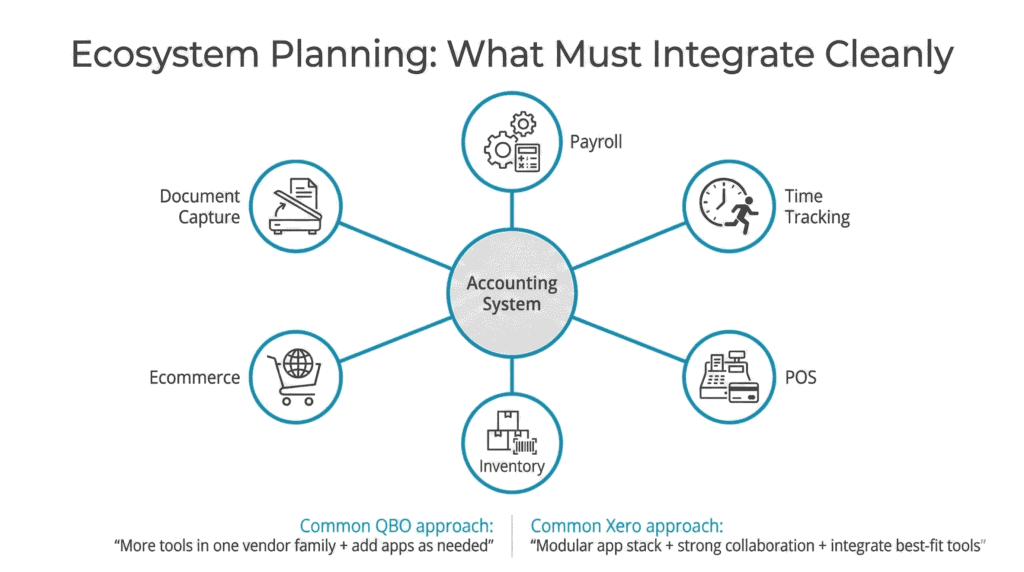
If you have payroll, time tracking, POS, inventory, ecommerce, and document capture tools feeding the books, the quality of the integration matters more than the number of integrations available. A “good” integration posts entries that reconcile cleanly, separates fees properly, and respects GST/HST logic. A “bad” integration creates extra clearing accounts, mismatches deposits, and forces your bookkeeper to do manual cleanup.
On the Xero side, it’s helpful that there are clear app categories for workflows teams commonly need, such as Xero POS apps and Xero time tracking apps. On the QBO side, Intuit highlights plan options and connectivity in its QuickBooks Canada plans and options pages, and many businesses pair QBO with specialized apps as they scale.
If you’re running a POS environment on QuickBooks and you want fewer reconciliation headaches, our POS integration with QuickBooks guide focuses on clean deposit mapping and practical setup choices.
Payroll decisions also deserve their own cost and process lens. If you’re weighing whether to keep payroll in-house or outsource as you grow, Payroll outsourcing vs in-house Canada breaks down the trade-offs in a way business owners can actually use.
Migration risks and cleanup checklist: do not “move the mess”
Most QBO vs Xero Canada horror stories are not really about the software. They are about moving messy books into a new system and assuming the mess will disappear.
It won’t.
When migrations go sideways, the pattern is predictable. Opening balances are wrong because bank and credit card reconciliations were never clean. Accounts receivable and payable are full of stale items that should have been resolved, written off, or cleared. GST/HST coding was inconsistent, so tax reporting does not tie out. Tracking structures do not map well between systems. Payment processor deposits were posted as sales instead of deposits, so revenue gets overstated while fees disappear.
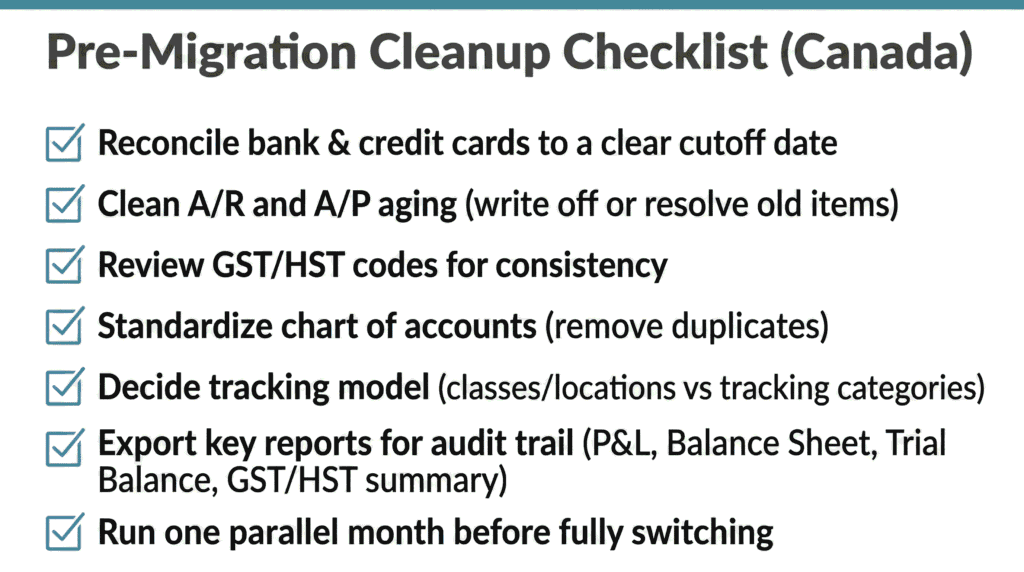
If you’re deciding between QBO vs Xero Canada, it’s usually cheaper to plan a cleanup phase than to pay for ongoing confusion. A clean migration is not just a technical export and import. It’s a financial reset where you confirm what’s real, what’s outdated, and what structure you want going forward.
In most cases, we recommend reconciling to a clear cutoff date, cleaning A/R and A/P aging so it reflects reality, reviewing GST/HST codes for consistency, and standardizing the chart of accounts to remove duplicates. Then you decide your tracking model in plain language, export key reports for an audit trail, and run a parallel month so you can compare results before you fully switch.
If you want to reduce manual work after migration, it’s also worth thinking about what you can streamline at the same time. The article on Bookkeeping Automation in 2026 is a useful companion because it focuses on removing repetitive steps that often creep back in after a system change.
A decision framework you can use in a leadership meeting
If you need to make a decision quickly, you can usually get to clarity by answering a few practical questions as a group.
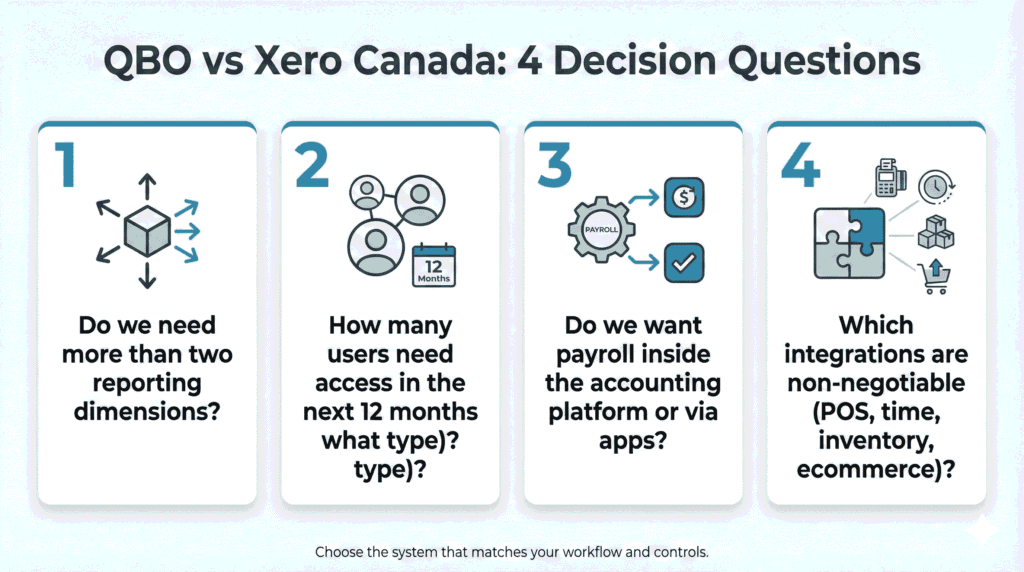
Start with reporting. Do you need more than two meaningful reporting dimensions? If yes, QBO often fits better. If no, Xero stays on the table and can be an excellent option.
Then talk about users. How many people need access this year and next, and what kind of access is it? View-only reporting users, bill approvers, and project leads can change the equation, especially if you want transparency across departments.
Next, decide how you want payroll to behave in your stack. Some teams want payroll inside the accounting vendor’s world, and QuickBooks Payroll Canada supports that direction. Other teams prefer a dedicated payroll tool integrated into accounting, and Xero’s approach on Xero payroll (Canada) aligns with that mindset.
Finally, list your non-negotiable integrations and test how they post. The “best” platform is the one that reduces manual reconciliation and prevents errors as transaction volume grows. That is the heart of QBO vs Xero Canada for teams that want reliable month-end numbers.
Implementation notes: what “done right” looks like
Whichever platform you choose, implementation is where you protect your future self.
A clean setup starts with a chart of accounts that supports management reporting without becoming overly detailed. It includes documented coding rules for GST/HST, meals and entertainment, vehicle expenses, reimbursements, and owner draws. It also includes a tracking structure that matches how leadership reviews results, plus clear roles for who enters bills, who approves, and who releases payments.
Month-end routines matter, too. A consistent close includes bank and credit card reconciliations, review of receivables and payables, payroll tie-outs where needed, and management reporting that leadership understands. When the routine is stable, your numbers stop feeling like a moving target.
This is also where internal controls become practical rather than abstract. The system should make it easier to do the right thing consistently. That is why QBO vs Xero Canada is ultimately a workflow decision, not just an accounting decision.
The bottom line for Canadian decision makers
QBO vs Xero Canada is not a popularity contest. It’s an operating decision.
QBO tends to be the better fit when you need flexible internal reporting and more than two reporting dimensions, especially for multi-location or multi-department businesses. Xero tends to be a better fit when collaboration is broad, your reporting fits inside two tracking categories, and you want a modular app stack that matches your industry.
If you take one thing from this guide, let it be this: choose the platform that supports clean data, consistent coding, and a month-end close your leadership team can trust.
At Valley Business Centre, we’ve supported businesses across Metro Vancouver, Whistler, Squamish, and the Sea to Sky Corridor for more than 30 years with bookkeeping, payroll, tax preparation, and cloud accounting systems.
If you’re a BC business with a growing team in Vancouver, Surrey, Burnaby, Richmond, Coquitlam, or North Vancouver and you want to make the QBO vs Xero Canada choice without migrating problems into a new file, reach out. We can help you tighten up tracking, reconcile deposits and payouts, keep documentation organized, and keep payroll and bookkeeping aligned so year end feels straightforward instead of stressful.
