

AI bookkeeping automation Canada is no longer a “nice add-on” reserved for tech-forward companies. In 2026, it’s becoming the practical way growing Canadian businesses keep their books current without hiring every time sales tick up.
That said, we see the same problem come up again and again. A business flips on automation, transactions start flowing in faster than anyone can review them, and the financials look tidy but feel questionable. The issue usually isn’t the software. It’s the lack of guardrails. When automation runs without controls, it can create fast errors that still take real time (and real money) to unwind.
In this guide, we’ll walk through four areas most Canadian businesses should tackle in order: bank rules, receipt capture, approvals and bill pay, and reporting. Along the way, we’ll keep an eye on GST/HST, payroll alignment, and month-end discipline, because AI bookkeeping automation Canada works best when it’s set up like a controlled autopilot, not a free-for-all.
Bookkeeping automation in 2026 in Canada: what’s actually changed?
A few years ago, “automation” mostly meant bank feeds and a handful of rules. In 2026, the tools are more capable, and the expectations are higher.
For starters, AI is now mainly assist-first. It can suggest categories, match transactions to receipts, flag anomalies, and even offer simple variance explanations. That’s useful, but it also makes it easier for busy teams to approve suggestions quickly, even when key details are missing.
At the same time, more systems connect directly to the books. It’s common to see bank feeds, credit cards, POS, ecommerce, payroll, expense apps, and bill pay tools syncing into one accounting file. The upside is speed and fewer manual touchpoints. The downside is that one bad mapping rule can ripple through everything.
The biggest shift is the risk of “faster wrong.” If your system confidently posts a vendor to the wrong account, it can do it repeatedly and consistently. That distorts margins, complicates GST/HST reporting, and leaves you with month-end numbers that look complete but need cleanup. AI bookkeeping automation Canada can absolutely reduce workload, but it also raises the value of good controls and review habits.
The 2026 automation roadmap: what to automate first
A practical rule of thumb is simple: automate high-volume, low-judgement work first. Save the judgement-heavy items for review until your foundation is clean.
That’s why AI bookkeeping automation Canada typically delivers the best return when you start with bank coding, then lock down receipts, then add approvals and bill pay workflows, and only then push dashboards and automated reporting. In other words, you build the pipeline first, then you trust what comes out of it.
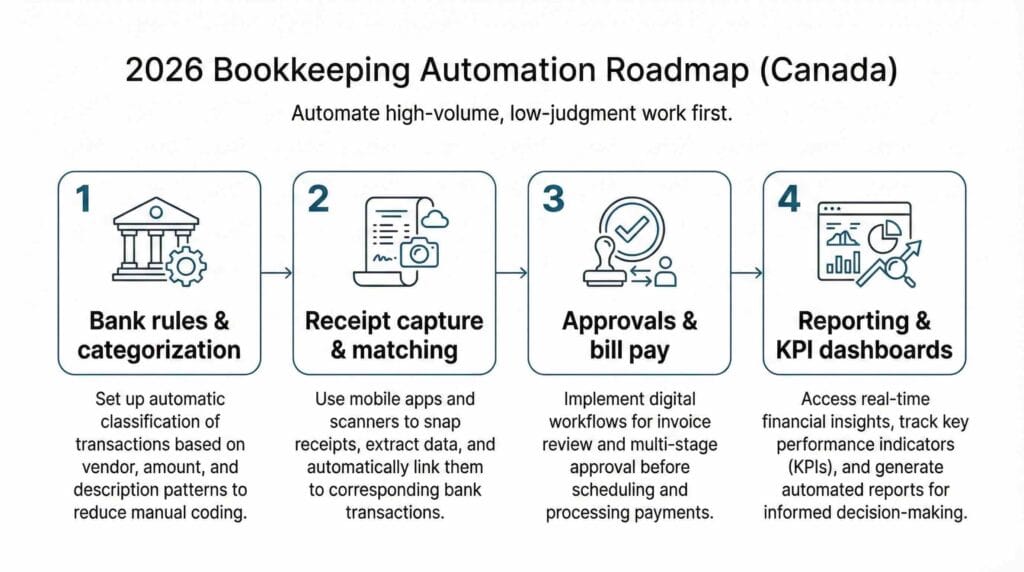
Step 1: AI bookkeeping automation Canada starts with bank rules and transaction categorization
If we had to pick one starting point, it’s the bank feed. Most businesses process hundreds (sometimes thousands) of bank and credit card transactions each month. Manual coding is slow, and it’s also where inconsistent decisions creep in when different people “guess” the account.
Begin with the easy wins: recurring vendors and predictable charges. Rent, software subscriptions, insurance, fuel, courier services, merchant fees, utilities, and bank fees usually belong in the same category month after month. Once those are stable, you can layer in known-merchant rules so frequent vendors default to the right accounts.
Split rules are worth setting up too, especially for mixed purchases. A common example is a big-box retailer charge that includes office supplies plus a small piece of equipment. If you routinely see the same patterns, splitting saves time and keeps reporting cleaner.
Now for the part that keeps you out of trouble: guardrails. Set a review threshold so larger dollar transactions require a quick look before they post. The exact number depends on your business, but the habit is what matters. Also keep a short list of categories that should never auto-post without review, because the cleanup cost is high if they’re wrong. Shareholder items, loans, payroll liabilities, and GST/HST payable or receivable accounts are common examples.
If month-end still feels rushed after you tighten bank rules, you’ll get value from a consistent close routine. Our month-end close checklist is a practical reference for what to verify and when, especially once transaction volume grows.
Finally, remember that automation doesn’t replace documentation. CRA still expects you to maintain clear support for transactions, so it’s worth reviewing the CRA’s record keeping requirements as you tighten your workflow. AI bookkeeping automation Canada is most powerful when the audit trail is strong.
Step 2: receipt capture and expense coding, so you stop chasing paperwork
If bank feeds are the volume play, receipts are the sanity play.
Most bookkeeping headaches we see in growing businesses aren’t complicated accounting issues. They’re missing receipts, unclear business purpose, duplicate claims, and last-minute scrambles when someone needs support for GST/HST or a corporate card expense.
Modern receipt capture tools make this easier. A quick photo can pull the vendor, date, and amount, then attach the receipt to the matching card or bank transaction. AI bookkeeping automation Canada helps with suggested coding too, but the real win is making “documentation” the default instead of the exception.

To keep the process clean, decide what information is required every time. If you track jobs, projects, customers, locations, or departments, don’t leave those fields optional. Make them mandatory for meaningful expenses so reporting stays consistent. It’s also worth turning on duplicate detection and missing-receipt prompts, because most messes are repetitive. A second submission of the same invoice, or a receipt that never arrives, can quietly skew expenses and tax reporting.
GST/HST accuracy matters here more than many teams realize. If receipts aren’t attached and tax codes aren’t applied consistently, your ITCs can be overstated or understated. For a straightforward refresher, CRA’s overview on GST/HST for businesses is a helpful reference when you’re setting rules and training staff. AI bookkeeping automation Canada should make compliance easier, not fuzzier.
Step 3: approvals and bill pay workflow for control and cash flow
Once bank coding and receipts are under control, the next jump is accounts payable workflow. This is where automation stops being “just bookkeeping” and starts supporting real management.
A good AP workflow typically tightens three things at once: visibility (what’s coming due), control (who approves what), and predictability (when payments run). In practice, that often means you centralize invoice intake, standardize coding and matching, route approvals based on thresholds or departments, and run scheduled payments instead of paying bills one at a time throughout the week.
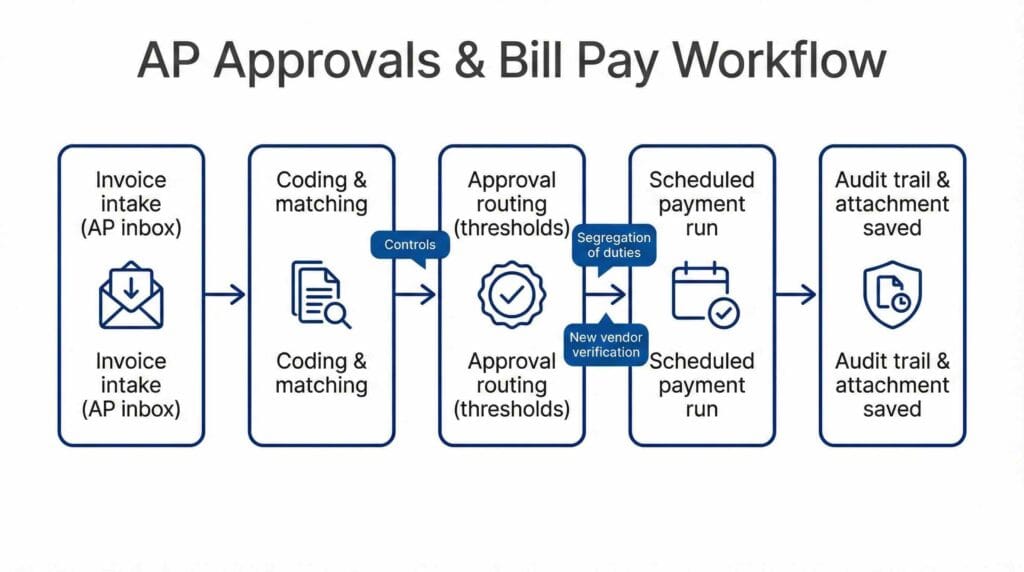
This matters even more as teams grow. Segregation of duties is basic risk management, not red tape. The requester should not be the only approver, and the approver should not be the only payer, especially once dollar amounts become meaningful. It’s also wise to add a simple “new vendor” verification step, because vendor changes are a common entry point for fraud attempts and payment errors.
If your operation has multiple sales channels, strong AP control pairs well with clean upstream sales data. For retailers and hospitality businesses, a reliable POS feed prevents mis-posting and reduces reconciliation time later. If that’s on your radar, our guide on POS integration with QuickBooks can help you plan a clean setup that won’t clutter your chart of accounts.
If you’re building bank rules and matching inside QuickBooks Online, it’s also worth scanning QuickBooks’ bank rules guidance so your team uses consistent settings and review steps. AI bookkeeping automation Canada works best when everyone follows the same playbook.
Step 4: reporting and KPI dashboards, so your books drive decisions
This is the part decision makers actually feel.
When AI bookkeeping automation Canada is set up well, you stop waiting for month-end to learn what happened. Instead, you get a weekly rhythm: updated numbers, short variance notes, and alerts when something looks off. That’s far more useful than month-old history, especially in businesses where cash flow, labour, and margin can shift quickly.
The key is to keep dashboards grounded in consistent mapping. If categories drift, your dashboard becomes noise. Two simple habits help: lock periods after month-end close, and keep your chart of accounts standardized so common vendors consistently land in the same place.
If you’re trying to make dashboards more actionable, it often helps to pair them with a forward-looking cash view. A dashboard tells you where you are. A cash forecast helps you decide what to do next. Our 12-week cash flow forecasting playbook is designed for exactly that kind of weekly cadence and decision-making.
Controls so automation does not create garbage data
This is the section people skip, and it’s usually the section they regret skipping later.
AI bookkeeping automation Canada should run like a controlled autopilot. You decide what can post automatically, what should be suggested for review, and what stays manual because judgement matters. The goal is not to slow things down. The goal is to keep the speed without losing trust in the numbers.
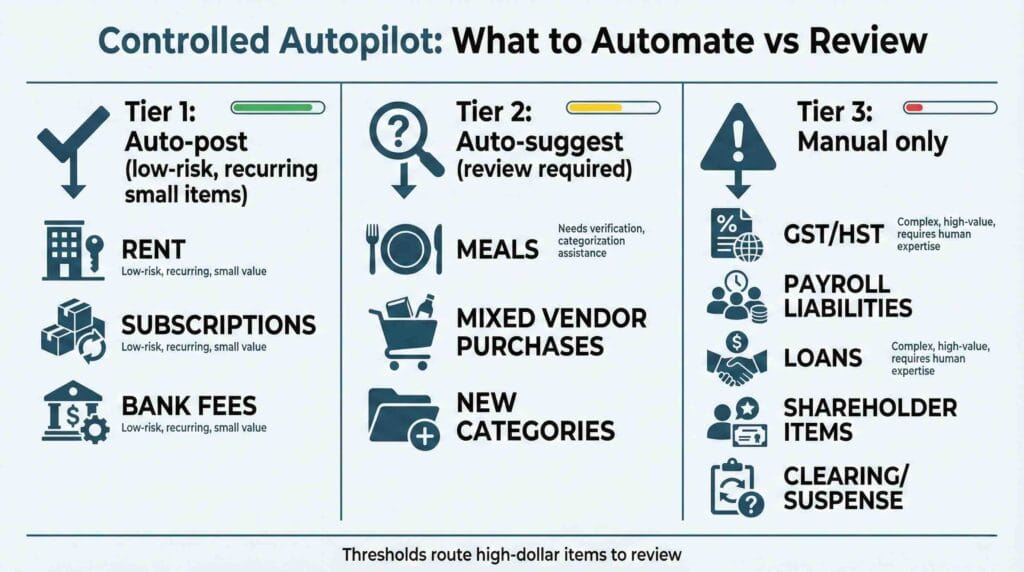
A simple control model that works in real businesses is a three-tier approach. Tier one is auto-post for low-risk, repetitive items. Tier two is auto-suggest, where the system proposes and a reviewer clicks to approve. Tier three is manual only for high-impact areas like GST/HST accounts, payroll liabilities, loans, shareholder items, and clearing or suspense accounts.
Once those tiers are defined, make weekly data-quality checks part of the routine. A quick review of uncategorized items, suspense balances, duplicate vendors, duplicate bills, and strange balances can prevent small problems from turning into month-end rework. It also helps you catch tax and payroll issues early, when fixes are easy.
If collections and cash timing are a frequent pain point, tightening these weekly checks tends to improve receivables discipline too. You’ll often see fewer “mystery payments” and fewer aging surprises when deposits and postings are reconciled promptly. If that’s your reality, our accounts receivable process article complements the weekly control habit nicely.
Month-end close for automated books: yes, you still need one
Automation reduces close time, but it doesn’t eliminate close. In fact, the more you automate, the more valuable close discipline becomes, because errors can spread faster when transactions post quickly.
A strong month-end close confirms the basics: bank and credit card reconciliations are completed and reviewed, A/R and A/P aging is checked for oddities, and payroll liabilities tie out. Payroll is one of the most common “silent mismatch” areas, where numbers look fine inside payroll software but don’t post correctly into the general ledger. GST/HST coding should also be reviewed for obvious misclassifications, especially if your business has a mix of taxable, zero-rated, and exempt items.
You’ll also want to clear exceptions and document adjustments before you lock the period. Consistency matters more than perfection here. When the same steps happen in the same order every month, managers start trusting the reporting because they know what’s been verified.
If you want a structured template, the Month-End Close Checklist for Canadian Businesses (2026) can be used as a baseline and adjusted to your stack.
KPI dashboard setup for owners and managers in 2026
A dashboard should answer a few simple questions: are we profitable, are we liquid, and are we on track by department, channel, or project?
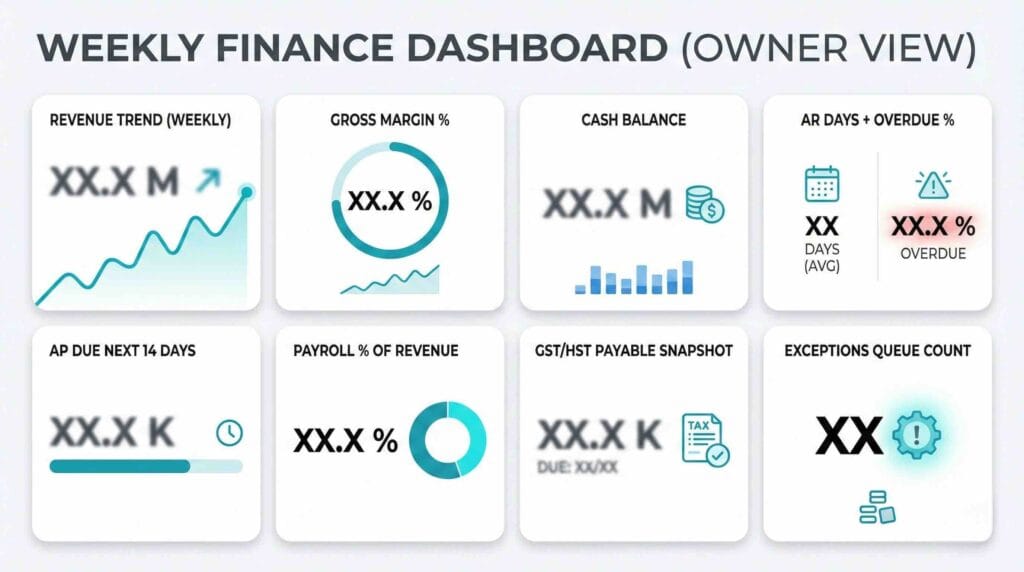
AI bookkeeping automation Canada helps because it can refresh numbers more often, but you still need to decide what “good” looks like and which metrics people will actually use. In most SMB and mid-market environments, the best dashboards start small and stay consistent.
A practical owner and manager dashboard usually includes revenue trend, gross margin percentage, operating expenses as a percentage of revenue, cash balance and runway, A/R days and overdue percentage, A/P timing, and payroll as a percentage of revenue. If labour is a key cost driver, tracking overtime trends also helps explain margin swings before they become surprises.
Payroll is also where we see a lot of operational decisions show up first, especially in service businesses. If you’re debating whether to outsource payroll or keep it in-house, your workflow design matters because you want payroll and bookkeeping aligned rather than operating in separate silos. Our payroll outsourcing vs in-house guide walks through the cost and control tradeoffs, and CRA’s payroll program page is a reliable reference for employer obligations.
For broader financial leadership and management reporting perspectives in Canada, CPA Canada is also a solid authority hub. Many teams find CPA Canada useful when they’re formalizing reporting routines and internal controls alongside AI bookkeeping automation Canada.
What this looks like as a 30 to 60 day implementation plan
Most businesses don’t struggle because tools are unavailable. They struggle because too many changes happen at once.
A smoother rollout usually starts with cleanup: chart of accounts, vendor list, and basic mapping rules. Then you implement bank rules with clear thresholds and a short do-not-autopost list. Next comes receipt capture with required fields and auto-matching. After that, you add AP intake, approvals, and payment controls. Finally, you standardize month-end close steps, lock periods, and roll out a dashboard with a weekly reporting cadence.
If you keep the scope tight, AI bookkeeping automation Canada gives you faster processing without destabilizing the books. You’re building a system your team can maintain, not a one-time setup that falls apart after a busy month.
When to bring in a pro and what to ask for
Sometimes you can tell you need help because your team is frustrated. Other times the sign is quieter: management stops trusting the numbers, even if the reports look polished.
It’s worth bringing in a pro when you see recurring uncategorized items or suspense balances, inconsistent monthly results that don’t match operations, approval bottlenecks that delay payments, or reporting that shifts simply because categories drift. Those are usually workflow and control issues, not “more data entry” issues.
When you’re evaluating support, ask questions that reveal the operating model. What gets auto-posted versus reviewed in your setup? How will GST/HST coding be protected from miscoding? Which exception reports are reviewed weekly? What’s the process for a clean month-end close as transaction volume grows? The answers tell you whether AI bookkeeping automation Canada will stay reliable as your business scales.
At Valley Business Centre, we’ve supported businesses across Metro Vancouver, Whistler, Squamish, and the Sea to Sky Corridor for more than 30 years with bookkeeping, payroll, tax preparation, and cloud accounting systems.
If you’re a BC business in Vancouver, Burnaby, Richmond, Surrey, Coquitlam, or North Vancouver and you want AI bookkeeping automation Canada to save time without creating messy books, reach out. We can help you tighten up tracking, reconcile deposits and payouts, keep payroll and bookkeeping aligned, and keep documentation organized so month-end and year-end feel straightforward instead of stressful.
