

Time tracking payroll integration is one of those projects that sounds straightforward until your first payroll run comes out wrong. For most Canadian businesses, payroll is not “just admin.” It’s a trust issue with your team, a compliance issue with rules that vary by jurisdiction, and a cash flow issue when corrections and retro pay pile up.
When it’s set up properly, time tracking payroll integration cuts duplicate entry, tightens approvals, improves job costing, and gives you labour reporting you can actually use. When it’s rushed, it tends to automate the chaos: duplicate hours, misapplied overtime, and managers signing off on timesheets they haven’t really reviewed.
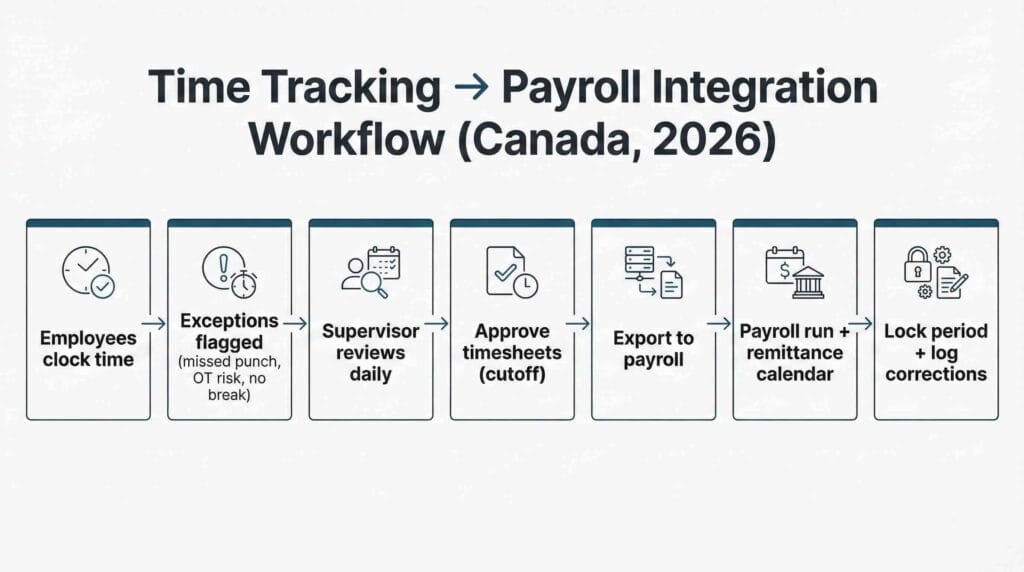
This guide is written for small business owners and mid sized decision makers who want a practical 2026 setup that works in the real world, especially for trades, hospitality, retail, and any operation with hourly staff and multiple locations or job sites.
Why this matters in 2026 and who this is for
In 2026, most teams aren’t deciding between paper and software. They’re deciding whether their systems talk to each other in a way that supports payroll week, or whether payroll still feels like a scramble every cycle. If hours can flow from time tracking into payroll with the right checks in between, you get fewer surprises and far fewer “we’ll fix it next run” moments.
We see the same pattern whether a business has 10 employees or 300. Late submissions force rushed processing. Approvals happen without anyone looking at exceptions. Spreadsheets drift into multiple versions. Job costing gets muddy, so pricing and staffing decisions start to rely on gut feel instead of clean numbers.
Time tracking payroll integration matters because it reduces handoffs. Fewer handoffs means fewer opportunities for errors, fewer last minute adjustments, and better documentation if you ever need to explain how a payroll number was calculated.
If you’re also working through broader process upgrades, it’s worth pairing payroll improvements with bookkeeping changes that reduce manual work. Our post on Bookkeeping automation priorities is a helpful companion because payroll is often one of the fastest places to see the benefit of automation done well.
Why manual timesheets create payroll errors and cost you money
Manual timesheets aren’t “bad.” They’re just fragile. They rely on perfect timing, consistent interpretation of rules, and someone catching exceptions before payroll is finalized. That’s a tall order when supervisors are busy, employees work different schedules, and payroll deadlines don’t move.
Here’s what we see most often when a business relies on manual entry. Timesheets come in late, which compresses the processing window and increases mistakes. Copying and pasting hours into payroll creates drift between versions of the same data. Clocking errors show up even when everyone is acting in good faith, because people forget punches, round inconsistently, or submit updates after approvals have already happened.
Overtime and premium pay is another common trouble spot. If your overtime rules aren’t configured and enforced consistently, payroll becomes a judgement call. That’s where small errors turn into recurring adjustments, especially in shift-heavy workplaces.
Then there’s job coding. When time gets coded to the wrong job, department, or location, job costing starts telling a story that isn’t true. The dangerous part is it often looks believable, so decisions get made on flawed margins.
Payroll errors also have a way of snowballing. They lead to employee frustration, retro pay, amended records, and occasionally compliance exposure. If you want to understand what tends to trigger extra attention, our guide on CRA payroll audit red flags explains the practical issues we see most often in the field.
What to integrate and what not to integrate first
A common misstep with time tracking payroll integration is trying to integrate everything on day one. In practice, the cleanest implementations are staged. You start with the items that reduce errors immediately, then layer on complexity once the foundation is stable.
Integrate these first in your time tracking payroll integration
Start with hours worked. That means regular hours, unpaid breaks, and any paid breaks your policy includes. Once that’s stable, configure overtime rules and premium pay codes so calculations are consistent across pay periods and managers aren’t “doing the math” differently by site.
Next, connect job codes or cost codes (and locations, if you need them). You don’t need a perfect structure on day one, but you do need labour to land in the right bucket for reporting. Finally, build approvals into the workflow. Approvals are the control point. If you skip them, time tracking payroll integration simply delivers errors into payroll faster.
Basic employee master data sync usually belongs in the first phase too, but it needs a clear owner. Decide where employee IDs, departments, managers, and pay rates will be maintained, and keep one system as the source of truth.
Integrate later once the foundation is stable
Once the core is working smoothly, then it makes sense to consider advanced scheduling optimization, complex tip pooling automation, multi-rate rules by task, or detailed accrual automation for vacation and sick banks.
For hospitality teams, tip reporting deserves special care before you automate anything that touches it. If you operate in BC, our tips and gratuities in BC payroll guide is a useful reference point for setting expectations and documentation before you build automation around tips.
Decide your “source of truth” up front
This is the quiet make-or-break decision in time tracking payroll integration. Where will you maintain employees and roles? Where will pay rates be updated? Where do job codes live? Who is allowed to change them?
If both systems can edit the same fields, mismatches and duplicates become almost inevitable. It usually shows up as incorrect rates, duplicated employees, or job codes that don’t match reporting. Decide it early, document it, and stick to it.
The 2026 setup checklist decision makers actually use
A good setup mirrors the real payroll week. The goal isn’t to create the fanciest configuration. It’s to create a repeatable routine where exceptions are reviewed, approvals happen on time, and payroll exports are clean.
A. Payroll calendar and pay periods
Start with the calendar. Confirm your pay frequency and processing day, then work backwards to set a realistic cutoff for time entry and approvals. Give yourself a buffer. If your cutoff is too tight, supervisors will approve late or approve blindly, and payroll will inherit the mess.
Decide how late submissions are handled and enforce it consistently. In a well-designed time tracking payroll integration, late time should trigger a correction workflow with an audit note rather than quiet edits after approval.
B. Rounding rules and time capture policy
Choose your rounding approach and document it. Decide whether rounding applies only to start and end punches or also to breaks, and make sure the system behaves the same way across locations.
Break handling is another area where clarity prevents drama. Some businesses use automatic break deductions. Others use attested breaks. Either way, the system should flag exceptions rather than hide them, because “no break recorded” is exactly the type of issue you want supervisors to see before payroll export.
If you operate in BC, it’s smart to align your written policy to what you actually enforce. The Employment Standards in British Columbia pages are a good baseline reference when you’re documenting break expectations and overtime treatment.
C. Overtime and premium pay configuration
This is where time tracking payroll integration can either save you or burn you. Confirm your overtime thresholds and how your organization applies them, then configure premium pay items like shift differentials, weekend premiums, and on-call pay. The configuration needs to match real scenarios, not just a clean “sample week.”
If you’re federally regulated, the Canada Labour Code hours of work and overtime resource can help you confirm general requirements, but you’ll still want to document your internal rules in plain language so managers apply them consistently.
Once configured, test messy scenarios on purpose. Include missed punches, split shifts, long shifts, and overtime thresholds. If the system handles messy weeks correctly, clean weeks are easy.
D. Job codes, cost codes, and departments
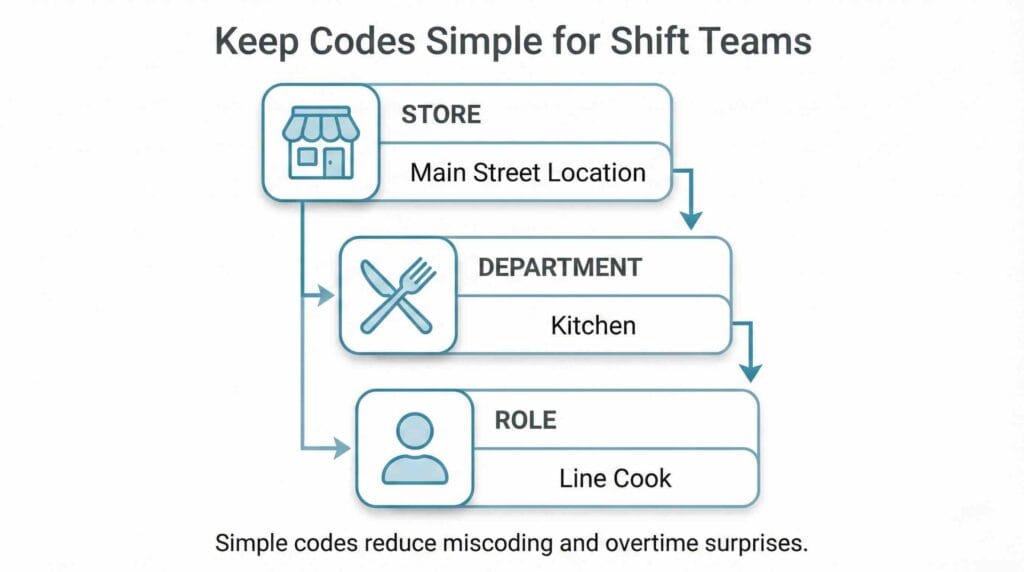
Job codes are where integrations quietly go off the rails. If your coding is too detailed, employees will pick something “close enough,” supervisors won’t have time to review, and job costing becomes fiction.
Keep the structure clean and predictable. For trades, a job, phase, and task hierarchy often works well. For retail and hospitality, store, department, and role is usually enough.
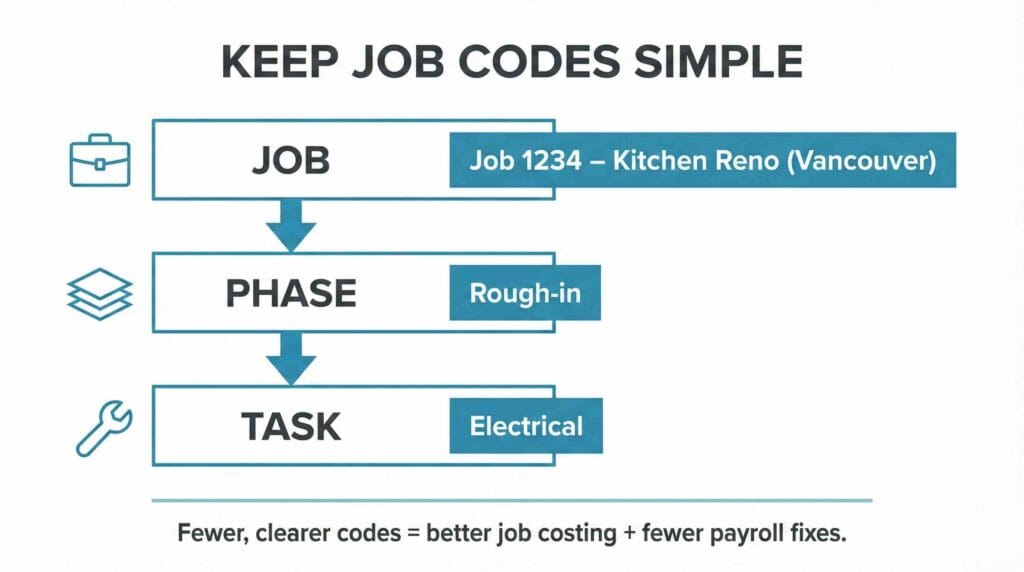
Defaults matter here. The more you can prefill, the fewer errors you’ll see at payroll time.
If job costing is a priority, it helps to make sure your coding approach ties neatly into your accounting workflow. Our job costing in QuickBooks guide goes deeper on how to keep labour reporting aligned with the way you review profitability.
E. Approvals workflow, the real control point
Approvals should not mean “approve everything.” That’s how managers end up clicking through screens without noticing the problems. A better approach is exception-based approvals. Normal shifts flow through. Exceptions get attention while they’re still fresh.
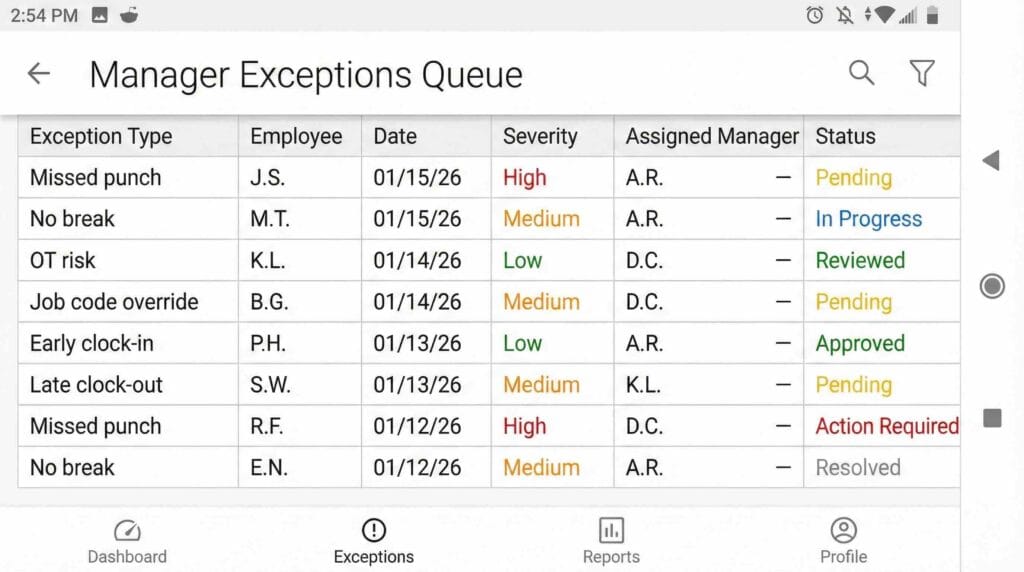
In practice, the exceptions that deserve review are predictable: missed punches, overtime triggers, no-break or short-break flags, early clock-ins or late clock-outs, and job code overrides. Once you define these, you can set a workflow where supervisors handle what matters, and payroll doesn’t get stuck waiting for blanket approvals.
Also define escalation. If a supervisor doesn’t approve on time, who steps in? A time tracking payroll integration without escalation tends to fail at the worst moment: right before payroll export.
F. Roles and permissions to prevent quiet payroll disasters
Permissions are internal controls. They protect you from honest mistakes and from changes that happen quietly after approval.
Employees should be able to submit time and request corrections within a window. Supervisors should be able to review exceptions and approve. Payroll admins should be able to export, correct with an audit trail, and lock periods. Limit who can change pay rates, edit approved time, add job codes, or override overtime flags. Those are the levers that create expensive errors.
If you’re weighing whether to manage all of this internally, our payroll outsourcing vs in house in Canada post can help you compare the true costs, including the time required for setup, testing, and ongoing administration.
G. Testing before go live
Parallel payroll is non-negotiable.
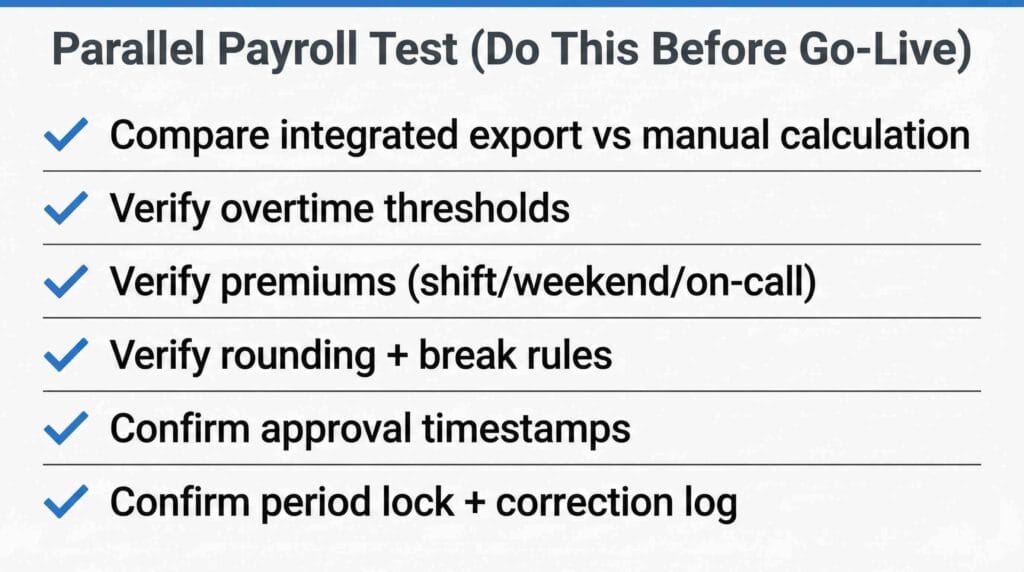
Run at least one cycle, and ideally two, where you export integrated time and compare it to what payroll would have been manually. You’re looking for overtime accuracy, correct premium pay, consistent rounding, correct job allocations, and approvals that are timestamped and auditable.
It’s also worth confirming your downstream paperwork expectations. When payroll is messy, ROEs can become messy too. Service Canada’s Record of Employment information is a good reminder of how important clean payroll records are when employment changes happen.
Common integration failures and how to prevent them
Even strong software can produce bad payroll if the workflow is unclear. The good news is that most failures are predictable.
Duplicate hours usually happen when manual entry and clock punches both flow into payroll, or when data gets re-synced without deduplication. The fix is structural: pick one input method per employee group, lock periods after export, and use duplicate detection where available.
Wrong job coding tends to show up when there are too many codes, naming is unclear, and supervisors don’t review overrides. The fix is simplification: fewer codes, clearer naming, sensible defaults, and approvals on job code changes. We also recommend a quick weekly labour allocation review on active jobs or locations so miscoding doesn’t sit unnoticed for months.
Incorrect overtime is almost always a configuration or definition problem. Thresholds aren’t set correctly, premium stacking is unclear, or “hours worked” is defined differently in time tracking versus payroll. The fix is documentation and testing. Write the rules in plain English, then test 10 to 15 real scenarios before go-live. Once live, set alerts when overtime spikes beyond what you’d expect.
Approval bottlenecks happen when managers are asked to approve everything and there’s no escalation path. Exception-based approvals, firm cutoffs, and a simple Monday morning approval routine typically solve this without adding admin time.
If you want the CRA’s broader payroll resource hub for deductions, remittances, and employer responsibilities, the CRA payroll deductions and remittances page is a solid bookmark for your payroll owner.
Best for trades: a simple, scalable workflow
Trades businesses usually care about two things: paying people correctly and knowing whether each job made money. A practical time tracking payroll integration workflow supports both without making the foreman’s day harder.
Employees clock in and out on mobile at the job site, sometimes with geofencing for high-mobility crews. Job codes default based on the schedule or last job worked so employees aren’t scrolling through long lists. Foremen review exceptions daily, focusing on missed punches, job transfers, and overtime triggers. That daily rhythm prevents small errors from turning into payroll-week surprises.
Each week, ops reviews labour by job versus estimate, and overtime by crew. Payroll exports only approved hours with job allocations, then locks the week so edits don’t happen quietly after the fact. If a correction is needed, it gets logged with a note so your audit trail stays clean.
Best for hospitality: shift-heavy reality without approval fatigue
Hospitality has a different pace. Schedules change, shifts run long, and managers don’t have time to approve every line. That’s why time tracking payroll integration needs to be built around exceptions.
A strong workflow starts with schedules published in advance and clock-ins tied to POS, tablet, or a controlled device. The system flags early clock-ins, late clock-outs, missed breaks, and overtime risk. Managers approve exceptions at the end of each day while the details are still fresh, and normal shifts flow through without extra clicks.
Tip reporting needs a deliberate decision, either through a controlled entry process or a carefully tested integration. If you’re unsure, it’s better to keep tip handling simple at first and automate later once the core workflow is stable.
When to outsource the setup and what to ask for
Some businesses handle time tracking payroll integration internally with great results, especially when there’s a clear internal owner and enough time to test. Others outsource because they want it done once, documented properly, and stress-tested before go-live.
If you outsource, ask for a documented workflow diagram that clearly shows who does what and when. Ask for a controls list that includes locks, permissions, and exception rules. Ask for parallel payroll testing, supervisor training, and a short employee guide. The outcome you’re paying for is fewer payroll adjustments, faster payroll close, and labour reporting you can trust.
A go-live plan that keeps payroll on time
Treat time tracking payroll integration like an operational change, not just a software switch. Start with a pilot group that reflects your real complexity, not just your most organized team. Communicate cutoffs clearly and enforce them consistently so the system doesn’t become optional.
During the first two cycles, watch exceptions closely. You’re not looking for blame. You’re looking for patterns that tell you what needs to be configured better, whether it’s rounding rules, break flags, job code defaults, or approvals timing.
After the first month, review the reports you actually care about: overtime by department, labour by job, and exception frequency by manager. Those metrics tell you whether your time tracking payroll integration is producing clean data, or whether you’re still relying on last minute fixes.
Key takeaways for 2026
A good time tracking payroll integration setup is less about the tool and more about the workflow. When your calendar, rules, job codes, approvals, and permissions are clear, payroll becomes repeatable. That’s when errors drop, managers stop dreading approvals, and you finally get labour reporting that supports real decisions.
If there’s one principle we’d emphasize, it’s this: approvals and testing are the control points. Automating messy inputs just delivers messy payroll faster, and it’s always harder to fix later than it is to design properly at the start.
At Valley Business Centre, we’ve supported businesses across Metro Vancouver, Whistler, Squamish, and the Sea to Sky Corridor for more than 30 years with bookkeeping, payroll, tax preparation, and cloud accounting systems.
If you’re a BC business with hourly teams in Vancouver, Surrey, Burnaby, Richmond, Coquitlam, or North Vancouver and you want time tracking payroll integration that reduces adjustments and keeps payroll week predictable, reach out. We can help you tighten up tracking, reconcile exceptions and approvals before exports, and keep documentation organized so year end feels straightforward instead of stressful.
