
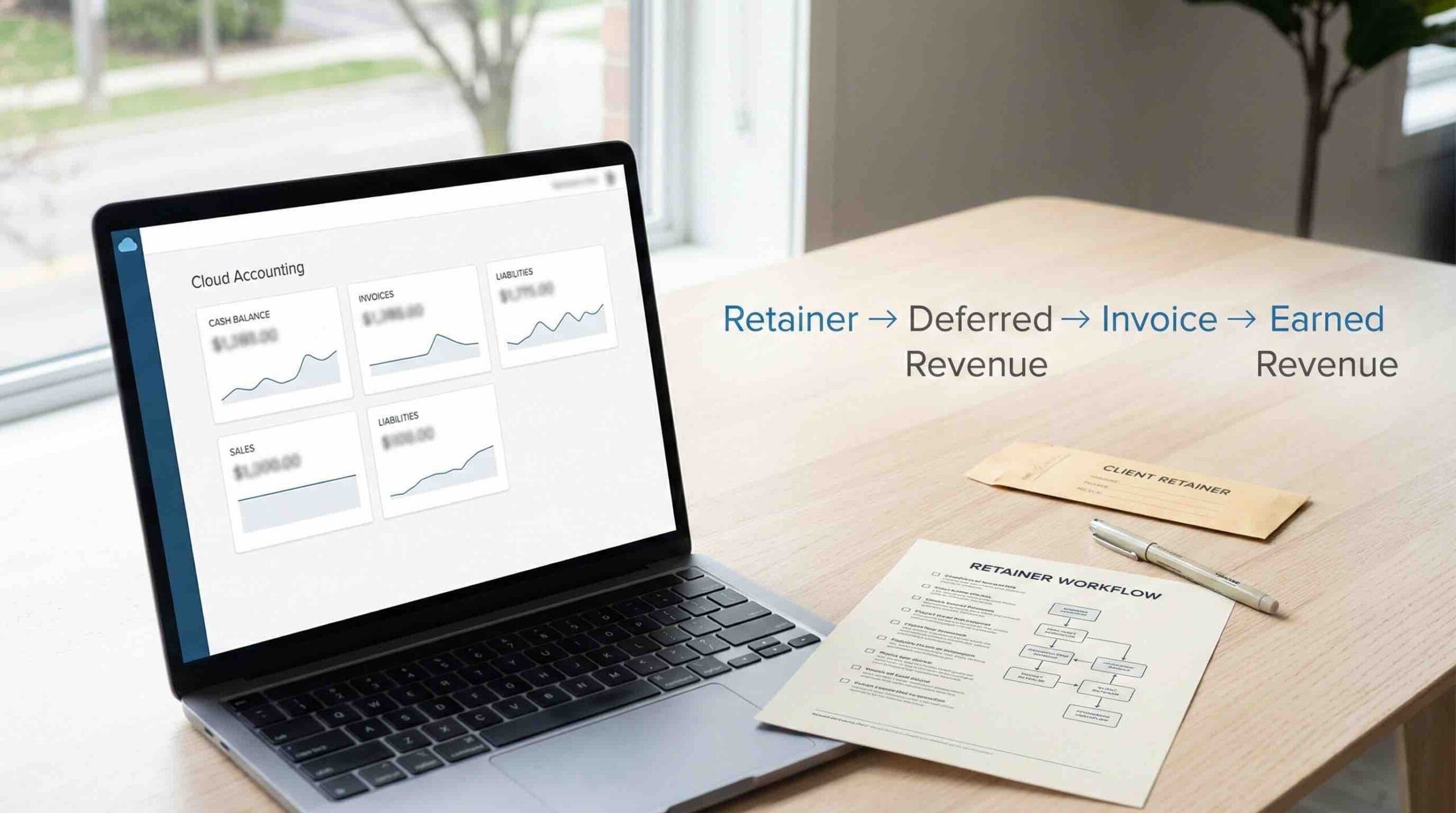
Retainers deferred revenue QuickBooks comes up when a business starts collecting money upfront and suddenly the numbers look better than the reality. Cash is in the bank, so the month feels strong, but the work still must be delivered. If the bookkeeping treats retainers as revenue right away, the Profit and Loss can quietly turn into a feel-good report instead of a decision tool.
This matters most for service firms that sell time and expertise: agencies, consultants, IT providers, law practices, and creative studios. Retainers and deposits are normal in those industries. The risk is not the retainer itself. The risk is reporting that tells you are profitable this month when you have really just collected next month’s workload.
The goal of this guide is practical. We want a setup in QuickBooks Online (QBO) that keeps revenue honest, keeps the Balance Sheet meaningful, and makes it easier to understand project profitability without doing a pile of manual journal entries every month. When retainers deferred revenue QuickBooks is set up properly, your team has a repeatable workflow, and your monthly review gets much calmer.
Retainers deferred revenue QuickBooks: why cash collected is not revenue earned
Here’s what we see most often. A client pays $10,000 upfront. It hits the bank feed. Someone codes it to Sales because it “matches the deposit” and everyone moves on.
That one step can distort a lot. Your Profit and Loss spike this month, margins look great, and you might start making decisions based on that “profit.” Meanwhile, the business still owes $10,000 worth of work, and future months can look artificially weak unless you keep collecting fresh deposits.
This is the false profit trap. Cash is real, but revenue has timing rules. When retainers deferred revenue QuickBooks is handled correctly, you can separate “money we collected” from “work we actually delivered.”
If your reporting is off, the consequences tend to show up in predictable ways. Hiring decisions get pulled forward. Pricing decisions are based on margins that are not real. Owner draws or dividends can creep higher than they should. You also end up with confusing month-to-month comparisons, because one month is heavy on deposits and the next month is heavy on delivery.
Even if you feel confident your business is healthy, this setup still matters. Clean retainer tracking makes the monthly scoreboard reliable, and it makes planning easier because you can see how much work you already owe.
Retainer vs deposit vs deferred revenue in plain English
Most teams use these words interchangeably, so let’s define them in a way that works for owners and managers.
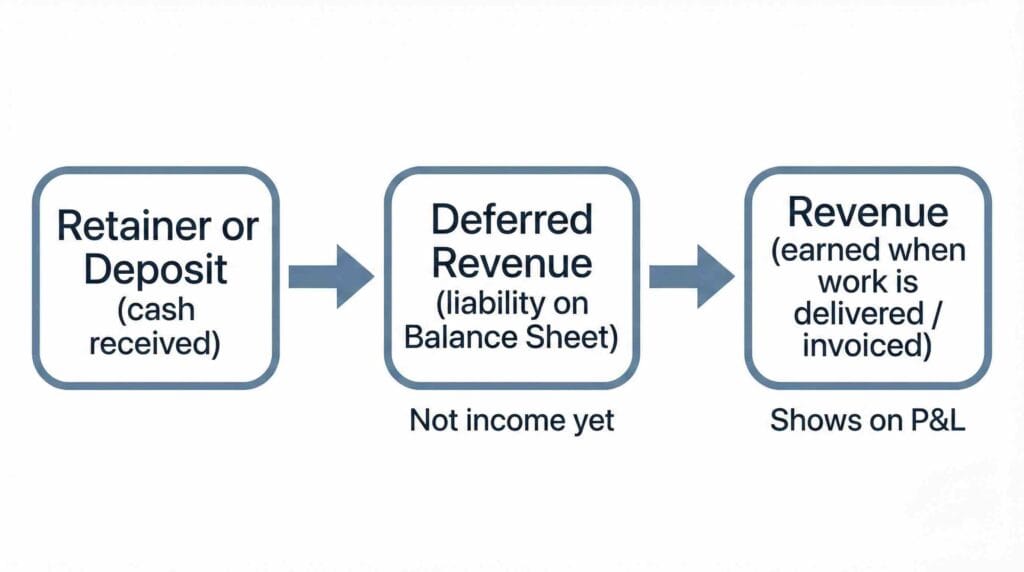
A retainer or deposit is money received before you’ve delivered the services. It might be a monthly retainer, an upfront project deposit, or an initial payment before work begins. The key point is timing: the payment arrives before the value is delivered.
Deferred revenue, sometimes called unearned revenue, is the Balance Sheet account that holds those funds until they are earned. In many cases it sits as a liability because the business owes future work, or may owe a refund depending on the contract. In other words, it is not “free money.” It is a commitment with a cash balance attached.
When does it become revenue? That depends on your billing policy, but the principle is consistent. Revenue becomes revenue when the service is delivered and recognized, often by invoicing as you work, invoicing at milestones, or invoicing at completion. A clean retainer deferred revenue QuickBooks workflow helps your financial statements follow that reality instead of the bank feed.
One Canadian nuance to keep in mind: even if you defer revenue for accounting purposes, GST/HST timing can still be triggered by payment or invoicing depending on your facts. If you want a reliable starting point, the CRA’s guidance in GST/HST general information for registrants explains the general rules and is worth reviewing with your accountant for your specific contract terms.
The right QBO setup for retainers and deposits
If you want this to stay clean as you grow, the biggest win is consistency. That means a workflow your team can follow the same way every time, without relying on memory or one person’s “special steps.”
The simplest QBO approach is this: record the payment to a liability account first, then recognize revenue as you invoice delivered work. QuickBooks provides a helpful starting reference on retainers and deposits in managing upfront deposits or retainers. We’re going to translate that into a practical setup you can actually run month after month.
Retainers deferred revenue QuickBooks setup: create the liability account
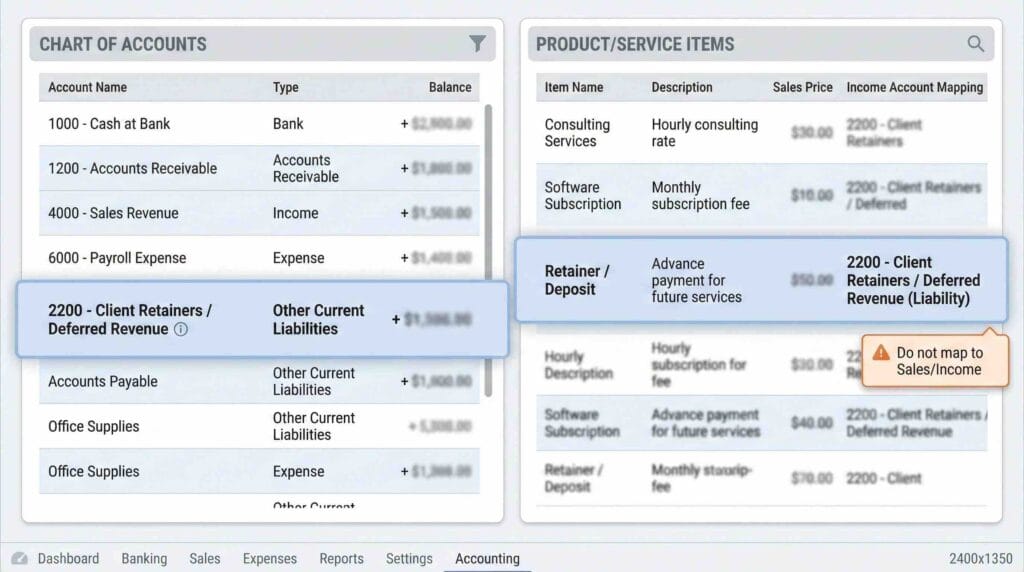
Create an “Other Current Liability” account with a clear name such as “Client Retainers / Deferred Revenue” or “Customer Deposits.” The name matters more than people think. Owners need to recognize it quickly on the Balance Sheet, and staff need to know it is not an income account.
This account is the holding place for money you have collected but not yet earned. When retainers deferred revenue QuickBooks is working properly, this liability balance is one of the most useful numbers on your Balance Sheet because it represents future delivery you already owe.
Create a Retainer or Deposit item mapped to the liability
In QBO, avoid relying on journal entries as the “normal workflow.” Instead, create a Product/Service item called “Retainer” or “Deposit” and map it directly to your retainer liability account. That mapping is the control point. It prevents the common mistake where a busy team member selects Sales because it feels intuitive in the moment.
Intuit’s step-by-step for setting this up and using it is laid out in record a retainer or deposit in QuickBooks Online. The important part is not the exact clicks. The important part is the accounting result: the retainer lands on the Balance Sheet, not the Profit and Loss.
Record the retainer when you receive it
When the client pays the retainer, record it using that retainer item, so the deposit increases your bank balance and increases the retainer liability balance. This is the moment where reporting either stays honest or gets distorted.
If the payment goes straight to Sales, the Profit and Loss inflate early. If it goes to the liability, you have done the correct first step. That is the foundation of retainers deferred revenue QuickBooks.
Apply the retainer when you invoice the work
When you deliver work, invoice as you normally would for the services delivered. Then apply the retainer so it reduces what the client owes and reduces the liability balance at the same time.
In practice, QBO often handles this by adding the retainer item as a negative line on the invoice. Intuit describes that approach in the same resource, record a retainer or deposit in QuickBooks Online.
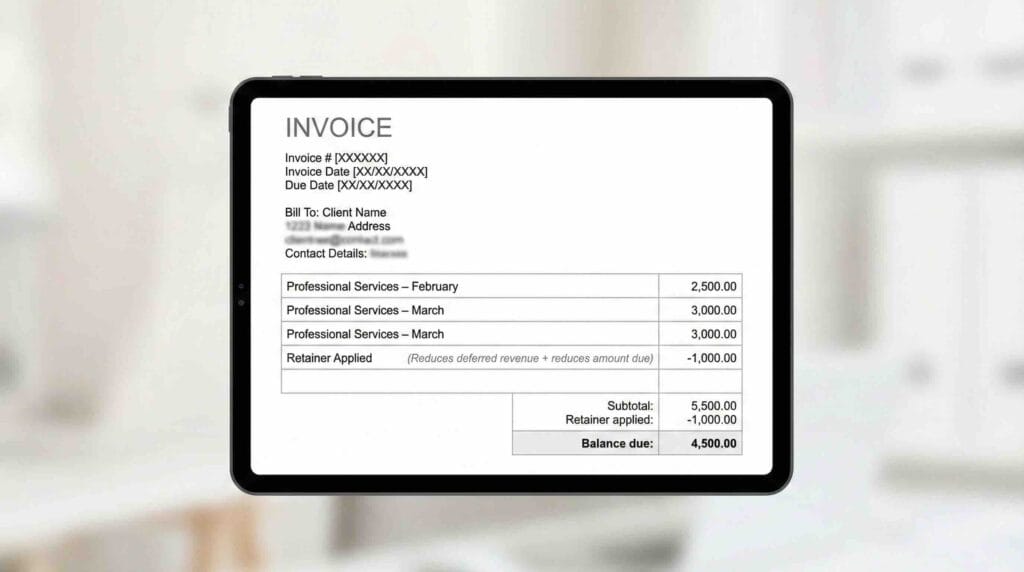
When this is done consistently, the reporting becomes straightforward. Your Balance Sheet shows how much prepaid work is still outstanding, and your Profit and Loss shows revenue as it is earned. That is the practical payoff of retainers deferred revenue QuickBooks.
How to apply retainers to invoices without messy reporting
A clean workflow helps, but an example makes it click.
Let’s say a client pays a $6,000 retainer on January 10 for work you’ll deliver over February and March. If you book that $6,000 as revenue in January, January looks great. February and March can look weak unless you invoice again. That pattern can make a healthy business look unpredictable, and it can make managers chase revenue that is already sitting in deferred revenue.
If you use the retainers deferred revenue QuickBooks approach instead, January shows the cash increase but no revenue increase. Then, as you deliver work, you invoice it and apply the retainer:
In February, you invoice $3,000 for February work, and apply $3,000 of the retainer to that invoice. Revenue shows in February because you earned it, and the deferred revenue liability drops by the same amount. In March, you do the same for the remaining $3,000.
For management, that alignment is everything. The monthly performance matches delivery. When leaders compare this month to last month, the trend means something.
One small operational tip that saves headaches: make “apply retainer to invoice” part of your invoicing checklist, not a step someone remembers when they have time. When it’s missed, the liability stays too high and Accounts Receivable can look odd. If your team is already tightening invoicing discipline, it helps to pair the workflow with a consistent receivables rhythm, like the approach our Accounts Receivable Process article.
Revenue recognition basics so your reports stay reliable
Most owners don’t want an accounting lecture. What you want is a reliable scoreboard.
The principle is simple: your Profit and Loss should reflect what you earned in the period, not what you collected. Cash can arrive early or late. Revenue should follow delivery.
Once retainers deferred revenue QuickBooks is set up correctly, there are a few common ways to keep the timing consistent:
If you invoice monthly as you work, apply retainers to those monthly invoices.
If you invoice by milestones, apply retainers at each milestone invoice.
If you deliver continuously but invoice less often, consider a month-end true-up so revenue better reflects work performed.
For many service businesses, monthly invoicing is the most practical. It reduces surprises, makes client communication easier, and it keeps management reporting clean without extra adjusting entries.
Two guardrails are worth stating clearly because they come up often in cleanups. First, don’t post retainers to income just to make the bank feed “match.” Matching is not the goal. Accuracy is the goal. Second, don’t treat deferred revenue like a plug account. If the deferred revenue balance changes, you should be able to explain why, such as new retainers collected, retainers applied to invoices, refunds processed, or a documented correction.
This is also where month-end discipline matters. If your close process is informal, it’s easy for retainer application and project coding to drift. A simple monthly rhythm, supported by our post on Month-End Close Checklist for Canadian Businesses (2026), can prevent small inconsistencies from becoming a year-end scramble.
Project profitability that actually works, especially with retainers
Retainers are often sold as a bundle: access, deliverables, and time. That model is common and it can be very profitable. The challenge is that profitability can be hard to “feel” unless you track costs consistently against the work.
For a retainer model, profitability becomes clearer when two things happen at the same time. Revenue is recognized when earned, and labour costs are assigned to the same client or project. When only one side is done properly, the profitability story gets blurry.
QBO Projects can help, but only if time and costs are coded in a consistent way. Intuit’s guidance on how Projects handles labour costing is here: track hourly labour costs and profitability by project.
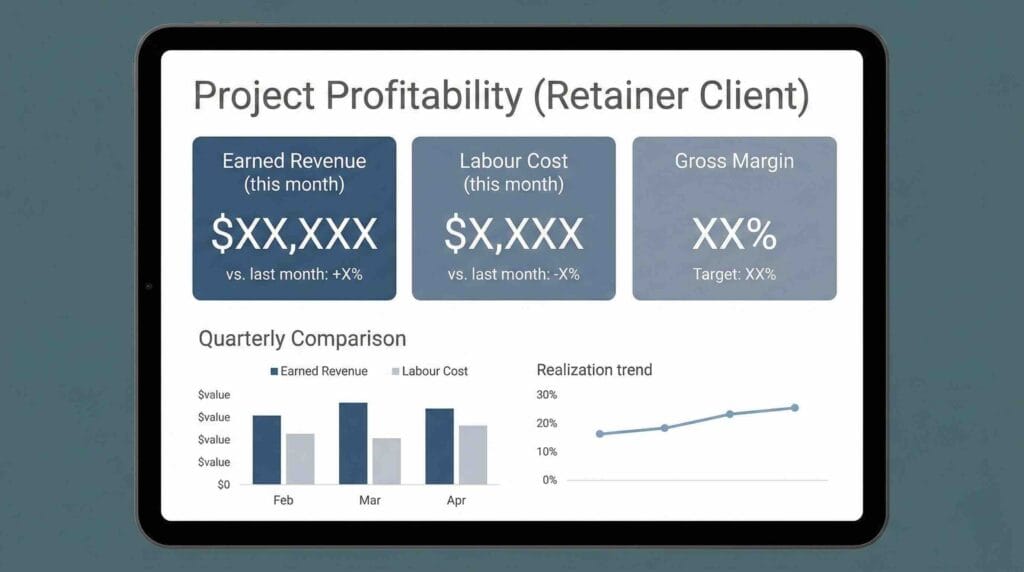
In practical terms, you want the day-to-day workflow to support the reporting you expect at month-end. Hourly staff should track time to the right client or project. Salaried staff should still capture hours if you want their cost allocated meaningfully. Contractors should have bills coded to the same client or project, so costs do not disappear into a general expense bucket.
This is where retainers deferred revenue QuickBooks becomes a leadership tool, not just a bookkeeping preference. If revenue is earned in the right period, and labour is assigned to the right work, your project profitability reports start reflecting reality. It also becomes easier to spot scope creep early, because realization drops before cash drops.
If you are already working on better time capture and payroll alignment, the workflow in Time Tracking + Payroll Integration in 2026 is a strong companion to retainer reporting. It helps keep payroll and project costing from becoming two separate worlds.
The owner report pack to review monthly
Once retainers are handled correctly, your monthly review becomes far more useful. Instead of debating whether revenue is “real,” you can spend your time discussing delivery, margin, and capacity.
A practical owner review typically includes the deferred revenue balance and what drove the change this month, retainer balances by customer, earned revenue for the month alongside the movement in deferred revenue, project profitability and realization trends, and a short view of receivables and cash planning.
Those measures also tie well into a consistent KPI set. If you want a simple set of monthly metrics that keeps leadership focused, our 5 KPIs Every Canadian Business Should Track Monthly (2026) post complements this retainer workflow nicely.
Because retainers change cash timing, forecasting becomes easier when you can separate cash collected from revenue earned. If you use a rolling forecast, linking deferred revenue to your planning process helps avoid overconfidence after a big deposit month. The 12-Week Cash Flow Forecasting guide is a practical next step if you want that rhythm.
Common mistakes in QBO and how to correct them
Most retainer problems are not caused by bad intent. They happen because someone is trying to move quickly and keep the bank feed tidy.
The most common issue is booking retainers directly to Sales. The fix is to reclassify those transactions into the retainer liability and then apply them against invoices as work is delivered, keeping clear documentation because prior-period reporting can change.
Another frequent issue is applying retainers through inconsistent credits without a standardized retainer item mapped to the liability. That tends to work for a month or two, then it becomes difficult to explain the deferred revenue balance. Standardizing the retainer item is usually the cleanest fix.
We also see businesses skip customer-level visibility. If you can’t answer “who are we holding money for,” the balance is harder to manage. QBO can provide that view by drilling into the liability and grouping by customer, which helps owners see outstanding delivery commitments clearly.
Finally, some firms mix operational cash workflows with regulated or trust-style workflows. If your industry requires holding funds separately, the bookkeeping should follow that policy and the steps should be documented so the team follows the same process every time.
Each of these issues undermines the point of retainers deferred revenue QuickBooks, which is to keep reports decision-ready as the business grows.
What to document so the workflow survives turnover
If you want this to stay consistent with new hires and changing roles, document the rules in plain language and keep them short.
Define what counts as a retainer or deposit in your business. Define when revenue is earned based on how you invoice and deliver. Define who applies retainers to invoices and when. Define how refunds or cancellations are handled. Define which reports leadership reviews monthly and what “normal” looks like.
This is also a good moment to confirm the software workflow fits your business. Some teams compare platforms as they scale. If that is on your mind, the decision framework in QBO vs Xero Canada (2026): Which Fits Growing Teams? helps clarify what matters when retainers, projects, and reporting are part of the day-to-day.
A quick checklist for a clean 2026 setup
A simple way to sanity-check your file is to ask a few direct questions.
– Do you have a clear deferred revenue or customer deposit liability on the Balance Sheet?
– Is your Retainer or Deposit item mapped to that liability, not to income?
– Are retainers applied to invoices consistently as work is delivered?
– Can you produce a by-customer view of retainer balances?
– Do your monthly reports separate earned performance from cash collection?
If those answers are yes, you are in a strong position. The retainers deferred revenue QuickBooks workflow is doing its job, and your reports are supporting good decisions instead of creating noise.
Set it up once, then let the system protect your reporting
Retainers and deposits are a smart commercial tool. They can stabilize cash flow and reduce collection stress, especially for service firms with longer delivery cycles. The downside only shows up when the bookkeeping turns prepayments into revenue too early and leadership starts making decisions on distorted margins.
A simple structure in QBO solves most of it: hold retainers in a liability account, apply them to invoices as work is delivered, and track costs to the same client or project so profitability reporting stays meaningful. When those pieces are in place, retainers deferred revenue QuickBooks becomes less about accounting rules and more about confidence in your monthly numbers.
At Valley Business Centre, we’ve supported businesses across Metro Vancouver, Whistler, Squamish, and the Sea to Sky Corridor for more than 30 years with bookkeeping, payroll, tax preparation, and cloud accounting systems.
If you’re a BC service business in Vancouver, Surrey, Burnaby, Richmond, Coquitlam, or North Vancouver and you want retainers and deposits handled cleanly in QBO without last minute stress, reach out. We can help you tighten up tracking, reconcile deposits and payouts, and keep documentation organized so month-end and year end feel straightforward instead of stressful.
